Chapter 9 Encoding Information
Brevity is the soul of wit.
— Shakespeare, Hamlet
Brevity is…wit.
— The Simpsons, S3 Ep. 37
Long before the invention of personal computers, the Internet, and mobile phones, at a time when letters were mostly transported by horse or occasionally by train, humans got their first taste of “instant communication” with the invention of telegraphy in the middle of the 19th century. Not only did the telegraphy system revolutionize the speed of communication, it also pioneered many techniques that are still at the heart of our modern computer networks, most importantly the idea of encoding information using electrical signals.
The telegraphy system was based on the Morse code shown in Fig. 9.1, which maps each letter of the Latin alphabet to a sequence of short and long electrical pulses that are separated by short delays. These codewords are then sent one after another, adding longer delays to form words and sentences. Other symbols such as digits and punctuation marks were not included in the original Morse code and had to be spelled out; for instance, the word STOP was used to indicate the end of a sentence. To reduce the average time required to transmit telegrams, not all codewords have the same length: The Morse code uses short codewords for common letters such as E and T and long codewords for uncommon letters such as Q and X.
Today, we use similar techniques to compress data that is transmitted over computer networks or stored on external devices such as hard drives. In fact, almost every piece of data you load from the Internet is compressed before it is sent over the network, and many file formats employ some form of data compression to save memory. It’s not an exaggeration to say that the Internet in its current form as well as many other aspects of modern computing would be inconceivable without data compression. In this chapter and the next, we will discuss a few fundamental algorithms for data compression and their implementations. Specifically, we will focus on algorithms that ensure that the data being compressed can be recovered exactly, down to the last bit. Such methods are also known as lossless compression algorithms.
9.1 Binary Codes
Similar to the way the telegraph system used the Morse code to convert English text into electrical signals, modern computers use binary codes to translate information into long strings of ones and zeros that can be transmitted, stored, and processed digitally. The process of converting data to bits is conventionally referred to as encoding and recovering the data from the bits as decoding. Let’s take a look at a few ways to design such binary codes.
The simplest binary codes are so-called fixed-length codes in which all letters are mapped to bit sequences of the same length. An important example of such a code is ASCII, the American Standard Code for Information Interchange, which was first published in 1963 and remains the basis for most text-based file formats. ASCII specifies 7-bit codewords for a total of 128 characters, including the Latin alphabet, decimal digits, as well as a selection of punctuation marks and mathematical symbols.1
The full ASCII code is shown in Fig. 9.2. Each character has a numerical code between 0 and 127 that is computed by adding the hexadecimal numbers at the top and to the left of the table. Even though 7 bits would be sufficient to represent all 127 ASCII characters, the codewords are usually extended to 8 bits by setting the highest bit to 0. This makes it easier to process ASCII text on byte-based computers.
For example, the ASCII encoding of “ABRACADABRA” can be found as follows. The letter ‘A’ is in the row labeled 40 and the column labeled 1, so its numerical value is the hexadecimal number 0x41. Looking up the codewords of the remaining ten characters in the same way, we obtain the following sequence of 11 hexadecimal numbers:
0x41, 0x42, 0x52, 0x41, 0x43, 0x41, 0x44, 0x41, 0x42, 0x52, 0x41.
Each of these numbers is converted to binary to obtain the bit sequence for the character, so 0x41 becomes 00110001, 0x42 becomes 00110010, and so on. The result is the following sequence of 88 bits:
00110001 00110010 01110010 00110001 00110111 00110001
00111000 00110001 00110010 01110010 00110001
In addition to normal characters such as letters and digits, ASCII also defines codes for so-called control characters, which were originally used to control output devices such as printers and terminals. The symbols in the first two rows of Fig. 9.2 as well as the DEL symbol in the last row are control characters. Only a handful of the control characters are still in active use, the most important being HT (horizontal tabulator), which is used to indent lines in text files, as well as CR (carriage return) and LF (line feed), which are used to represent line endings.
Fixed-length codes like ASCII have the obvious advantage of being easy to encode and decode, but they lack flexibility. The obvious solution is to introduce variable-length codes in which not all codewords are required to have the same number of bits. Here is an example of a simple variable-length code:
| symbol | A | B | R | C | D |
| codeword | 0 | 10 | 11 | 110 | 001 |
We can use this code to encode the word “ABRACADABRA” by mapping each letter to the corresponding bit sequence:
| A | B | R | A | C | A | D | A | B | R | A |
| 0 | 10 | 11 | 0 | 110 | 0 | 001 | 0 | 10 | 11 | 0 |
The final encoding is therefore 0101101100001010110.
The problem with this code becomes clear as we try to recover the original message from the bit sequence. Let’s try to decode 0101101100001010110 to see what happens. The first three bits are 010, and it’s not hard to see that this bit sequence can only be obtained by concatenating the codewords of A and B, so we can decode the first two letters “AB”. But the next three bits 110 are problematic since they can either stand for the two-letter sequence “RA” or the single letter C. At this point, we no longer no whether the original message started with “ABRA” or “ABC”. As we will see in Exercise 9.4, there are 16 different ways of decoding the entire bit sequence. The code is said to be ambiguous.
1 The lack of support for languages other than English is a major limitation of ASCII. In Exercise 9.14 we briefly discuss Unicode, the official standard for representing international text.
Prefix Codes
How can we prevent such ambiguities? In other words, how can we ensure that every a bit sequence produced by a binary code can be decoded in exactly one way? One solution to this problem is based on the following observation: The root cause of the ambiguities in the previous example was that the codewords for A and R (0 and 11) could also be interpreted as the first bits of the codewords for D and C (001 and 110). We say that the codewords for A and R are prefixes of the codewords for D and C, respectively. (More generally, a prefix is a sequence of characters that appears at the start of a string. For example, the word MARK is a prefix of MARKET since the entire word MARK appears at the start of MARKET, but it is not a prefix of REMARK (it appears at the end, not the start) or MARTIAL (only the first three letters match).)
What happens if no codeword is a prefix of another codeword? For example, we can make the code above prefix-free by modifying two of the offending codewords, for example by encoding A as 01 and C as 0001:
| symbol | A | B | R | C | D |
| codeword | 01 | 10 | 11 | 0001 | 001 |
We call binary codes in which no codeword is a prefix of another codeword prefix-free codes or simply prefix codes.
If we use this code to encode “ABRACADABRA” again, we now obtain the bit sequence
\(\seteqnumber{0}{9.}{0}\)\begin{equation*} \bits {0110110100010100101101101}. \end{equation*}
To decode this bit sequence, we again start by searching for the longest codeword that matches the start 011011. In this case, the only matching codeword is 01, so the first letter must be A. The remaining bit sequence is 101101…, and again there is only one matching codeword, which we decode as B. We continue in this manner until we have split the entire bit sequence into codewords and decoded the original message:
| 00 | 10 | 11 | 01 | 0001 | 01 | 001 | 01 | 10 | 11 | 01 |
| A | B | R | A | C | A | D | A | B | R | A |
At no point during the decoding process do we encounter a situation where more than one codeword matches the start of the bit sequence.
It’s not hard to see that this is no coincidence and that prefix codes are always unambiguous. Consider the problem of decoding an arbitrary bit sequence generated using such a code. Since this bit sequence was generated by concatenating one or more codewords, there must be at least one codeword that matches the start of the sequence. But there also cannot be more than one matching codeword, since then the code wouldn’t be a prefix code. The first symbol can therefore be decoded unambiguously. By applying the same reasoning to the remainder of the bit sequence, we see that the entire message can be decoded unambiguously.
The fact that two codewords in a prefix code never have the same prefix has another important consequence: There is a one-to-one correspondence between prefix codes and certain binary trees. For example, the tree representation of the code
| symbol | A | B | R | C | D |
| codeword | 01 | 10 | 11 | 0001 | 001 |
is shown in Fig. 9.3. There is one leaf node for each of the symbols A, B, R, C, and D. Now follow the path from the root to each of the leaves and write down a 0 every time you move left and a 1 every time you move right. The sequence of zeros and ones you obtain in this way is the codeword of the symbol stored in the leaf. For example, the letter A is reached by moving left and then right (codeword 01) and R is reached by moving twice to the right and once to the left (codeword 110). More generally, if we are given any binary tree whose leaves are labeled with symbols, we can convert it into a prefix code by following the path from the root to each of the leaves.
Conversely, given a prefix code, we can construct the corresponding binary tree by following the path for each codeword and creating nodes and leaves as necessary (see Exercise 9.7). This direct correspondence between prefix code and binary trees is extraordinarily useful in practice and the basis of many algorithms that operate on prefix codes.
Exercises
[9.1]The ASCII code in Fig. 9.2 is defined in such a way that certain operations are easy to perform.
-
a) Implement functions isDigit(), isLower(), and isUpper() that determine whether a given ASCII character is a decimal digit, a lower-case letter, or an upper-case letter.
-
b) Write a function toUpper() that takes an ASCII-encoded character and converts it to upper-case if possible and leaves it unchanged otherwise.
[9.2]One of the oldest and simplest encryption methods is the Caesar cipher, named after the Roman emperor Julius Caesar. In this cipher, every letter is replaced by another letter a fixed distance away, with letters at the end of the alphabet wrapping around. If we set the offset to \(3\), for instance, A becomes D, B becomes E, …, and Z becomes C. Characters that aren’t letters between A and Z are left unchanged.
-
a) Explain how to encrypt and decrypt ASCII-encoded letters using the Caesar cipher. (See also Exercise 9.1.)
-
b) Jul vf guvf pvcure eneryl hfrq?
[9.3]When designing codes, it is often more efficient to group multiple letters into one symbol instead of encoding each letter individually. For example, using the following code
| symbol | AB | R | AC | AD | A |
| codeword | 000 | 001 | 010 | 011 | 100 |
we can encode “ABRACADABRA” using merely 21 bits:
000001010011000001100.
Design a similar code that uses groups of at most two characters to encode the same string using fewer than 15 bits.
[9.4]We noted in the text that the bit sequence 0101101100001010110 has 16 different interpretations when trying to decode it with the ambiguous code
| symbol | A | B | R | C | D |
| codeword | 0 | 10 | 11 | 110 | 001 |
One of these interpretations is the original text “ABRACADABRA”. What are the other 15?
[9.5]Consider the following table of codewords:
| symbol | A | B | R | C | D |
| codeword | 1 | 001 | 101 | 01 | 000 |
Is this a prefix code? Sketch the binary tree associated with this code.
[9.6]A unary code encodes every nonnegative integer \(k\) as a sequence of \(k\) zeros followed by a single one; in other words, the numbers \(0, 1, 2, 3\) are encoded as \(\bits {1}, \bits {01}, \bits {001}, \bits {0001}\), and so on. Now consider the code we obtain by reversing each codeword, so that the numbers \(0, 1, 2, 3\) are mapped to \(\bits {1}, \bits {10}, \bits {100}, \bits {1000}\). Which of these two codes is a prefix code, and which can be decoded unambiguously?
9.2 Implementing Prefix Codes
Now that we understand the basics of prefix codes, we can turn to their implementation. The PrefixCode class in Listing 9.1 stores a prefix code in two forms: The codewords field is an array of Codewords indexed by the numeric value of the symbol, and root is the root of the corresponding binary tree. The nested type Codeword represents a single codeword and stores the bit sequence in the least significant bits of bits and its length in a separate length field.
Listing 9.1ch9 / PrefixCode
// Representation of prefix codes.
public class PrefixCode {
    public record Codeword(long bits, int length) {
    }

    public record Node(Node left, Node right, int symbol) {
    }

    private final Codeword[] codewords;  // table of codewords
    private final Node root;  // associated binary tree

    // ...
}
To represent the binary tree we use the nested type Node that has links to the left and right subtree and an optional field symbol for storing the symbol associated with a leaf node. The Node type can represent both inner nodes and leaf nodes. If both left and right are null, the node is a leaf node and symbol holds the numeric value of the associated symbol. Otherwise, it is an inner node and left and right point to the left and right child, respectively. To simplify the task of creating these two types of nodes, we define the two convenience methods makeLeaf() and makeInner(), as shown in Listing 9.2.
Listing 9.2ch9 / PrefixCode
// Create a leaf node for 'symbol'.
public static Node makeLeaf(int symbol) {
    return new Node(null, null, symbol);
}

// Create an inner node.
public static Node makeInner(Node left, Node right) {
    return new Node(left, right, -1);
}
The constructor PrefixCode() in Listing 9.3 takes the root of a finished binary tree as its only argument and uses it to initialize the table of codewords. We first initialize codewords by allocating an array that is large enough to hold every symbol that occurs in the tree; the helper method maxSymbol() recursively finds the largest symbol in the tree. We then call computeCodewords() to fill the table of codewords.
Listing 9.3ch9 / PrefixCode
// Create a prefix code from a binary tree.
public PrefixCode(Node root) {
    this.root = root;
    this.codewords = new Codeword[maxSymbol(root) + 1];
    computeCodewords(root, 0L, 0);
}

// Find the largest symbol in the subtree of node.
private int maxSymbol(Node node) {
    if (node == null)
        return Integer.MIN_VALUE;
    if (node.left == null && node.right == null)
        return node.symbol;
    return Math.max(maxSymbol(node.left), maxSymbol(node.right));
}
JDK: Integer, Math
•PrefixCode: Codeword, computeCodewords(), Node
The implementation of computeCodewords() is shown in Listing 9.4. The method recursively traverses the binary tree while keeping track of the path that leads from the root to the current node. The path is stored as a string of up to 64 bits in bits and its length in length. The length starts at 0 is incremented every time the method descends into the left or right subtree of a node. If the current node is a leaf node, which is the case when it contains a non-negative symbol, we create a new entry in the table of codewords from the bit sequence in bits. Otherwise, if the current node is an inner node, we process its left and right subtrees recursively. For the left subtree we append a 0-bit to bits and increment length, and for the right subtree we append a 1-bit.
Listing 9.4ch9 / PrefixCode
private void computeCodewords(Node node, long bits, int length) {
    if (node == null)
        return;
    if (node.symbol >= 0) {
        codewords[node.symbol] = new Codeword(bits, length);
    } else {
        computeCodewords(node.left, bits << 1, length + 1);
        computeCodewords(node.right, (bits << 1) | 1, length + 1);
    }
}
Exercises
[9.7]Write a function that constructs a binary tree from an array of codewords. If the codewords don’t describe a valid prefix code, the function should throw an exception.
Encoding and Decoding with Prefix Codes
Let’s turn to the problem encoding and decoding data using prefix codes. In the following we will make use of two classes for reading and writing bits: BitOutputStream and BitInputStream. BitOutputStream write groups of bits to some kind of output stream (say, a file or a network connection). It is is defined as follows:
public class BitOutputStream {
    public void writeBits(long bits, int n);
    public void writeBit(long bits) {writeBits(bits, 1);}
    // ...
}
Calling writeBits() writes the n least significant bits of its first argument bits to the output; writeBit() is provided for convenience and writes a single bit. The corresponding functionality for reading bits is provided by BitInputStream:
public class BitInputStream {
    public long readBits(int n);
    public long readBit() {return readBits(1);}
    // ...
}
Calling readBits() returns the next n bits from the input and returns them in the least significant bits of a long integer; readBit() reads a single bit. We will discuss the implementation of these two classes in detail in Exercise 9.13.
We can now extend the PrefixCode class with methods for encoding and decoding individual symbols. To output a single symbol, we look up its entry in the codewords table and then append the corresponding bit sequence to the output (Listing 9.5). If the symbol is invalid, the writeSymbol() method throws an exception.
Listing 9.5ch9 / PrefixCode
public void writeSymbol(int symbol, BitOutputStream out)
        throws IOException {
    if (symbol < 0 || symbol > codewords.length
            || codewords[symbol] == null) {
        throw new RuntimeException("Invalid symbol");
    }
    Codeword codeword = codewords[symbol];
    out.writeBits(codeword.bits, codeword.length);
}
The reverse operation decodes a single symbol by finding the codeword that matches the bit sequence at the current position in a BitInputStream. Since every codeword corresponds to a path from root to one of the leaf nodes, the simplest way to decode the next symbol is to read one bit at a time and move left in the tree if it is 0 and right if it is 1 (Listing 9.6). Once we reach a leaf node, we have identified the next codeword and return the associated symbol. If decodeSymbol() encounters a null reference while traversing the tree, it stops and throws an exception. This can only happen if the input doesn’t start with a valid codeword, for example because it was encoded using a different code or because one of the bits was corrupted during transmission. In either case, there is nothing we can do to recover the original message, so we give up immediately.
Listing 9.6ch9 / PrefixCode
public int decodeSymbol(BitInputStream in) throws IOException {
    Node node = root;
    while (node != null) {
        if (node.left == null && node.right == null)
            return node.symbol;
        node = in.readBits(1) == 0 ? node.left : node.right;
    }
    throw new IOException("Invalid bit stream");
}
Encoding the Code Itself
In our discussion so far, we have assumed that the decoder already knows the code that was used to create the bit stream. This isn’t always the case: In many applications, the prefix code must be tailored to the data being encoded and is therefore not known in advance. In this case, decoding is only possible if we transmit the code along with the encoded bit sequence — in other words, we have to encode the code itself. In the case of prefix codes there are two options: We can encode either the table of codewords or its tree representation.
The writeTree() function in Listing 9.7 demonstrates how to encode the tree representation of a prefix code. The function traverses the tree recursively and writes a binary representation of node and all its subtrees to out. The last argument bitsPerSymbol specifies the number of bits that should be used to encode the symbol stored in the leaf nodes. The bit encoding of each node starts with two bits that indicate which of its subtrees are present. For leaf nodes, the two bits are 00 and are followed immediately by the bit representation of the node’s symbol field. For inner nodes, the two bits are 10, 01, or 11, depending on whether the node has a left child, a right child, or both. These two bits are followed by the bit representations of the left and right subtrees, which are generated by calling writeTree() recursively.
Listing 9.7ch9 / PrefixCode
// Write bit representation of 'node' and its children to 'out'.
void writeTree(BitOutputStream out, Node node, int bitsPerSymbol)
        throws IOException {
    if (node.left() == null && node.right() == null) {
        out.writeBits(0b00, 2);
        out.writeBits(node.symbol(), bitsPerSymbol);
    } else {
        out.writeBit(node.left() != null ? 1 : 0);
        out.writeBit(node.right() != null ? 1 : 0);
        if (node.left() != null)
            writeTree(out, node.left(), bitsPerSymbol);
        if (node.right() != null)
            writeTree(out, node.right(), bitsPerSymbol);
    }
}
Ideally, we would like to set the bitsPerSymbol parameter to the smallest number that covers all symbols of this prefix code. If \(n\) is the largest symbol, how many bits are needed to encode \(n\)? With \(k\) bits we can represent numbers between 0 and \(2^k-1\), so we have to find the smallest integer \(k\) that satisfies the inequality \(n\le 2^k-1\). By taking the base-2 logarithm and rounding up to the nearest integer, we obtain the bit length of \(n\)
\(\seteqnumber{0}{9.}{0}\)\begin{equation} \label {eq:bitlen} \bitlen (n)=\bigl \lceil \log _2 (n+1)\bigr \rceil . \end{equation}
We already met the expression on the right-hand side in Section 5.3, where we discussed a way to compute it without having to use logarithms or floating-point arithmetic. According to Eq. (5.8), we have
\[ \bitlen (n) = w - \operatorname {nlz}(n), \]
where \(w\) is the bit width of the variable that holds \(n\) and \(\operatorname {nlz}(n)\) the number of leading 0-bits of that variable. An implementation of the bitlen function is shown in Listing 9.8.
Listing 9.8ch9 / IntUtil
// The number of bits required to represent a non-negative integer.
public static int bitLength(int value) {
    assert value >= 0;
    return 32 - Integer.numberOfLeadingZeros(value);
}
JDK: Integer
For a given PrefixCode, the largest symbol is simply the length of the codeword array minus 1. The writeCode() method in Listing 9.9 first writes this length as an 8-bit integer to the output stream, and then appends the bit representation of the entire tree. This completes the problem of encoding the prefix code.
Listing 9.9ch9 / PrefixCode
// Write representation of this prefix code to 'out'.
public void writeCode(BitOutputStream out) throws IOException {
    int bitsPerSymbol = IntUtil.bitLength(codewords.length - 1);
    out.writeBits(bitsPerSymbol, 8);
    writeTree(out, root, bitsPerSymbol);
}
•BitOutputStream: writeBits()
•IntUtil: bitLength()
•PrefixCode: writeTree()
To decode a prefix code from a bit stream, we first read 8 bits to determine the value of bitsPerSymbol and then call readTree() to recursively decode the actual tree (Listing 9.10). The implementation of readTree() reverses the operation of writeTree() by first reading two bits to determine whether to decode an inner node or a leaf node. In the case of an inner node, the function calls itself recursively to read the left and right child nodes. In the case of a leaf node, it simply reads the next bitsPerSymbol bits to recover the symbol stored in the node.
Listing 9.10ch9 / PrefixCode
public static PrefixCode readCode(BitInputStream in)
        throws IOException {
    int bitsPerSymbol = (int) in.readBits(8);
    return new PrefixCode(readTree(in, bitsPerSymbol));
}

static Node readTree(BitInputStream in, int bitsPerSymbol)
        throws IOException {
    boolean hasLeft = in.readBit() != 0;
    boolean hasRight = in.readBit() != 0;
    if (hasLeft || hasRight) {
        Node left = hasLeft ? readTree(in, bitsPerSymbol) : null;
        Node right = hasRight ? readTree(in, bitsPerSymbol) : null;
        return makeInner(left, right);
    } else {
        return makeLeaf((int) in.readBits(bitsPerSymbol));
    }
}
9.3 Huffman Coding
In the previous section we saw how to decode the codewords of a prefix code by searching for a path from root of the corresponding binary tree to one of its leaf nodes. This one-to-one correspondence between prefix codes and binary trees has another important consequence: It allows us to design prefix codes by constructing binary trees with certain desirable properties. In fact, it even allows us to construct optimal prefix codes that encode a given sequence of letters using the fewest bits possible.
To see how this works, let’s return to the message “ABRACADABRA” and try to find an optimal prefix code for the individual letters. The five letters A, B, C, D, R occur at the following frequencies:
| symbol | A | B | R | C | D |
| frequency | 5 | 2 | 2 | 1 | 1 |
so the total length of the bit encoding of “ABRACADABRA” is
\(\seteqnumber{0}{9.}{1}\)\begin{equation*} L = 5l_A + 2l_B + 2l_R + 1l_C + 1l_D, \end{equation*}
where \(l_s\) denotes the length of the codeword of symbol \(s\). For a prefix code, the length of a symbol \(l_s\) is equal to the distance of the corresponding leaf node from the root of the tree, its depth \(d_s\) in the tree. Finding an optimal prefix code is therefore equivalent to constructing a binary tree that minimizes the following weighted sum of depths:
\(\seteqnumber{0}{9.}{1}\)\begin{equation*} L = 5d_A + 2d_B + 2d_R + 1d_C + 1d_D. \end{equation*}
It turns out that there is a simple algorithm for constructing such a tree. It is based on the observation that the two least frequent symbols, in this example C and D, must be placed at a maximum distance from the root of the tree. We can therefore start by populating the lowest levels of the tree with the least common symbols and successively add more frequent symbols into the upper levels of the tree. Let’s start by creating leaf nodes for all symbols and sorting them by their frequency:
We now construct a binary tree with these five leaves from the bottom up. First, we combine the two least frequent symbols by making them children of a new inner node:
The label of the new node is obtained by adding the frequencies of its two children, in this case \(1+1=2\). This cumulative frequency reflects the fact that we are no longer trying to construct optimal codewords for C and D separately but to find an optimal prefix for both of them.
In the next step, we again combine two nodes with the smallest label. We pick any two of the three nodes with label \(2\) and combine them into a new node with cumulative frequency \(4\):
In this example, we have combined the nodes for B and R, but any other pair of nodes with label 2 would be just as good.
The two nodes with the lowest frequency are now the roots of the two trees we created in the previous steps. We combine them to produce a tree with frequency \(6\) and reorder the nodes:
We then combine the two remaining nodes to form the root of the final tree:
This final tree is called a Huffman tree, and by following the paths from the root to each leaf we obtain the corresponding Huffman code. The codeword of A is 1 since we reach the node by going right once, the codeword of B is 000 since we go left three times, and so on:
| symbol | A | B | R | C | D |
| codeword | 1 | 000 | 001 | 010 | 011 |
How much better is this code than the ad-hoc prefix code we constructed in the previous section? Encoding ABRACADABRA produces the following bit sequence of length \(23\)
10000011010101110000011.
In this case, the Huffman code saves \(5\) bits compared to the 28 bits required before, which amounts to a respectable 18% improvement. For a given table of symbols and frequencies, no other prefix code produces a shorter bit sequence.2
Algorithm 9.1 summarizes the algorithm for constructing Huffman trees. The input of the algorithm is a list of symbols \(S\) and a list of associated frequencies \(F\).3 In the first phase of the algorithm, we create one leaf node for each symbol, and in the second phase we repeatedly combine pairs of nodes to build the Huffman tree from the bottom up. The algorithm presented here assumes that there are at least two symbols; Exercise 9.8 discusses how to construct a Huffman tree when there is just a single symbol.
Algorithm 9.1
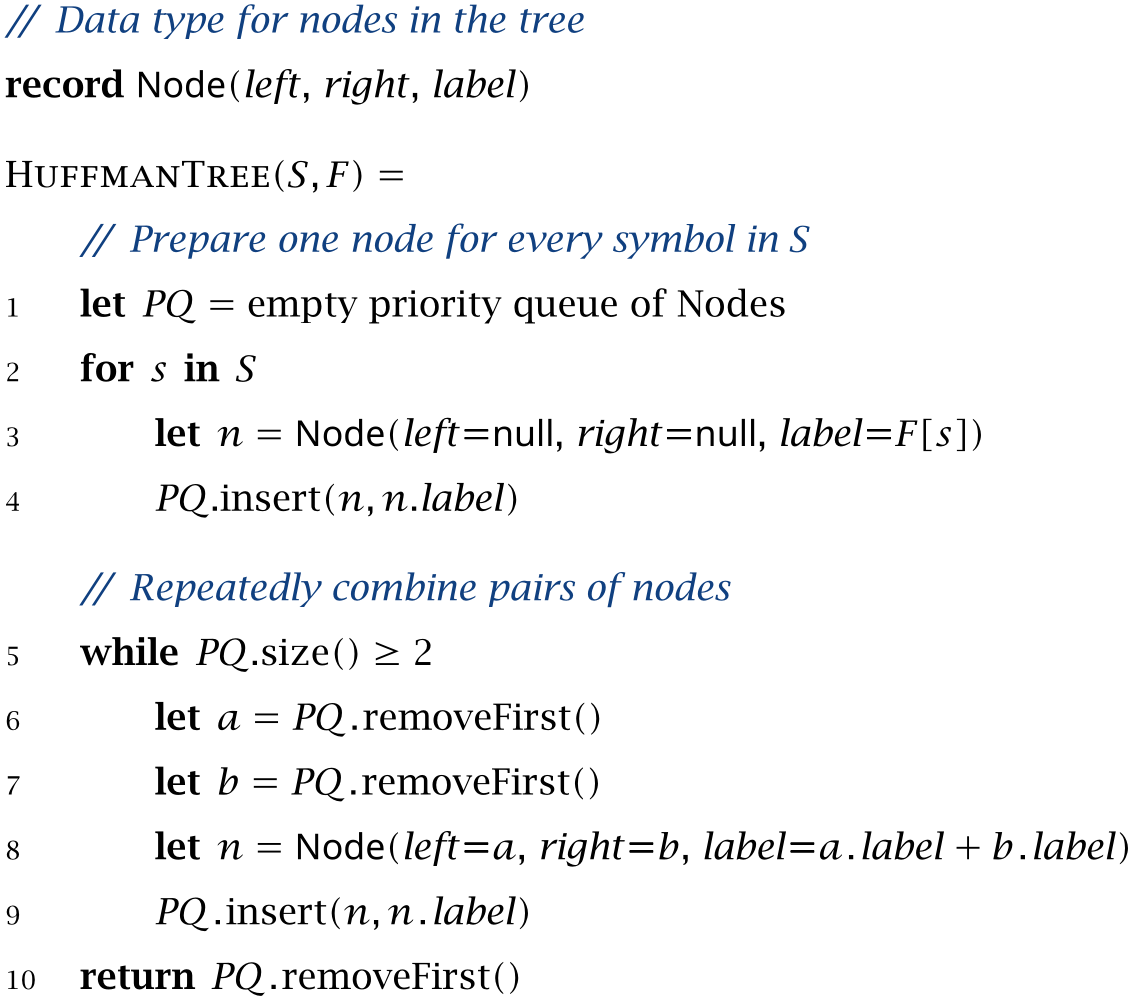
As mentioned, the tree constructed by HuffmanTree always produces an optimal prefix code, but in many cases there are other trees and codes that are just as good. To see this, first note that our choice to make \(a\) the left subtree and \(b\) the right subtree of \(n\) in line 8 is completely arbitrary: Exchanging the two subtrees merely flips a few bits in the resulting codewords. In addition, there may be multiple nodes with the same value of label at the front of the priority queue, and multiple choices for the nodes \(a\) and \(b\) in lines 6 and 7, which leads to additional variations that are equally good. Exercise 9.10 asks you to construct all the possible Huffman trees for a particular set of symbols and frequencies.
In practice, it is often desirable to implement Huffman’s algorithm in such a way that it always returns the same tree for a given set of symbols and frequencies. We will discuss how to do this in the following section.
2 See [86, Section 5.5] for a formal proof.
3 We assume that the frequencies are integers that indicate how often each symbol actually occurs in the text, but the algorithm works equally well with probabilities that indicate how often each symbol is expected to occur.
Exercises
[9.8]Consider a message that consists of a single repeated symbol. What is the optimal prefix code for such a message? How does the corresponding Huffman tree look, and how do you have to modify the HuffmanTree algorithm to accommodate this special case?
[9.9]Consider the following code that treats the word ABRACADABRA as a single symbol with the codeword 0:
| symbol | ABRACADABRA |
| codeword | 0 |
This code is appears to be even better than any Huffman code, since it compresses ABRACADABRA down to a single bit! What’s the catch?
[9.10]Consider again the following frequency table:
| symbol | A | B | R | C | D |
| frequency | 5 | 2 | 2 | 1 | 1 |
How many different Huffman trees can be constructed for this table? Which of the resulting codes encodes “ABRACADABRA” using the fewest bits?
9.4 Implementing Huffman Codes
In order to turn the abstract description of Huffman’s algorithm into a working computer program, we need to choose data structures for (a) the list of symbols and their frequencies, (b) the list of partial trees and their numeric labels, and (c) the final Huffman tree. Let’s discuss these in turn.
If we assume that every symbol is a nonnegative integer, we can store the symbols and their frequencies in an array of integers freq in which freq[k] is either the frequency of the \(k\)th symbol or 0 if the symbol isn’t used. For example, the frequency table for “ABRACADABRA” can be initialized as follows:
int freq = new int[256];
freq['A'] = 5;
freq['B'] = 2;
freq['R'] = 2;
freq['C'] = 1;
freq['D'] = 1;
This uses the ASCII code of each letter to index the table. Since newly created arrays are initialized to zero, the remaining letters are implicitly marked as unused.4
Since the result of Huffman’s algorithm is an ordinary binary tree, we can use the PrefixCode.Node type to represent its nodes and the final tree itself. In addition, we define the auxiliary data type HuffmanCode.Entry shown in Listing 9.11 to associate a numeric label that holds the frequency with each such node. This record has three fields: node is a node in the tree, freq is the associated frequency, and id is a unique identifier whose purpose we will explain shortly. Huffman’s algorithm consumes nodes in the order of increasing frequency, so the compareTo() method compares entries by their frequency first, and in the case of equal frequencies, by their identifier.
Listing 9.11ch9 / HuffmanCode.Entry
record Entry(int freq, int id, PrefixCode.Node node)
        implements Comparable<Entry> {
    public int compareTo(Entry o) {
        return freq != o.freq ? Integer.compare(freq, o.freq)
                : Integer.compare(id, o.id);
    }
}
JDK: Comparable, Integer
•HuffmanCode: Entry
•PrefixCode: Node
What are these identifiers, and why are they necessary? As we saw in the previous section, it’s not uncommon for multiple symbols or nodes in a Huffman tree to have the same frequency, so the layout of the final Huffman tree can depend on the order in which the algorithm chooses and combines these nodes. The purpose of the id fields is to ensure that the Entrys are always chosen in a unique, well-defined order. This ensures that our implementation of Huffman’s algorithm always produces the same tree for a given set of frequencies.
A possible implementation of Huffman’s algorithm is shown Listing 9.12. The main data structure is a priority queue that maintains the active list of partial trees. The algorithm starts by initializing pq with one Entry for each symbol that occurs at least once. The variable nextID is used to assign each entry a unique id.
Listing 9.12ch9 / HuffmanCode
// Construct the Huffman tree for the given table of symbols.
public static PrefixCode construct(int[] freqTable) {
    var pq = new PriorityQueue<Entry>();
    int nextID = 0;
    for (int symbol = 0; symbol < freqTable.length; symbol++) {
        if (freqTable[symbol] > 0) {
            pq.add(new Entry(freqTable[symbol], nextID++,
                    PrefixCode.makeLeaf(symbol)));
        }
    }
    if (pq.isEmpty())
        throw new RuntimeException("Frequency table is empty");

    if (pq.size() == 1) {
        return new PrefixCode(
                PrefixCode.makeInner(null, pq.poll().node));
    }
    while (pq.size() >= 2) {
        Entry a = pq.poll();
        Entry b = pq.poll();
        pq.add(new Entry(b.freq() + a.freq(), nextID++,
                PrefixCode.makeInner(b.node, a.node)));
    }
    return new PrefixCode(pq.poll().node);
}
JDK: PriorityQueue, RuntimeException
•HuffmanCode: Entry
•HuffmanCode.Entry: Entry()
•PrefixCode: makeInner(), makeLeaf(), Node, PrefixCode()
If the resulting priority queue is empty (which can only happen if all frequencies are zero), there is no way to construct a valid Huffman code and we throw an exception. If the priority queue contains a single entry, we return a binary tree that contains a single leaf to the right of the root; the resulting code contains a single symbol with codeword 1. In all other cases, we construct the tree by combining two entries a and b from the front of the priority queue. The freq field of the new Entry is set to the sum of the frequencies of a and b, and its id is set to a unique value. After combining all pairs of entries, the node field of the last remaining entry is returned as the root of the Huffman tree.
4 A more general alternative would be a to use a table-like data structure such as a HashMap that contains symbol/frequency pairs, but the simple array-based approach will be sufficient for our purposes.
Compressing Files using Huffman Codes
Finally, let’s discuss how we can use Huffman coding to compress real files. We assume that the input is an InputStream, which is Java’s standard class for byte-based input, and that the output is being written to a BitOutputStream. The general idea is to iterate over the input to count how often each byte occurs, use the resulting table of frequencies to construct a Huffman code, and then iterate over input a second time to convert each byte into the corresponding codeword.
For simplicity, we assume that the file being compressed is small and can be stored in an array of bytes. When compressing large files that are tens or hundreds of megabytes in size, it’s usually preferable to split them into many smaller blocks that are compressed separately. This has the added advantage that we can use different Huffman codes for each block, which often leads to better compression rates.
The implementation of the complete compression algorithm is shown in Listing 9.13. In addition to the 256 possible bytes, we define an additional symbol called END_SYMBOL that is used to mark the end of the compressed data. Upon reading this symbol, the decoder knows that the end of the compressed data has been reached and that any remaining bits can be ignored. This is necessary because there is no reliable way to detect the end of a BitInputStream: as we will discuss in Exercise 9.13, bit streams must often be padded with additional bits if their total length is not a multiple of 8.
The compress() method in Listing 9.13 implements compresses arbitrary files using Huffman coding. For simplicity, we first read the entire file, store its contents in inputBytes, and then count how frequently each byte occurs. We then construct the Huffman code from the array of byte frequencies, write a representation of the resulting PrefixCode to the output, and finally iterate over the input a second time to emit the codewords of each byte to the output. Since our implementation of Huffman codes expects symbols to be nonnegative integers, we use Byte.toUnsignedInt() to convert each byte to a number between 0 and 255.
Listing 9.13ch9 / HuffmanPacker
// Symbol that indicates end of compressed data.
static final int END_SYMBOL = 256;

// Compress data using Huffman coding.
public static void compress(InputStream in, BitOutputStream out)
        throws IOException {
    byte[] inputBytes = in.readAllBytes();
    int[] freq = new int[257];
    for (byte b : inputBytes)
        freq[Byte.toUnsignedInt(b)]++;
    freq[END_SYMBOL] = 1;

    var code = HuffmanCode.construct(freq);
    code.writeCode(out);
    for (byte b : inputBytes)
        code.writeSymbol(Byte.toUnsignedInt(b), out);
    code.writeSymbol(END_SYMBOL, out);
    out.flush();
}
JDK: Byte, InputStream
•PrefixCode: writeCode(), writeSymbol()
To decode the compressed file, we simply revert the steps of the encoder, as shown in Listing 9.14. The decompress() method reads the compressed data from a bit stream of type BitInputStream and writes the uncompressed bytes to an OutputStream. The first step is to recover the Huffman code that was used to compress the data by calling readCode() and storing the result in huffmanCode. We then use this code to decode the remainder of the input, reading one byte after another until the END_SYMBOL is encountered.
Listing 9.14ch9 / HuffmanPacker
// Decode data compressed using Huffman coding.
public static void decompress(BitInputStream in, OutputStream out)
        throws IOException {
    var huffmanCode = PrefixCode.readCode(in);
    int symbol = huffmanCode.decodeSymbol(in);
    while (symbol != END_SYMBOL) {
        out.write((byte) symbol);
        symbol = huffmanCode.decodeSymbol(in);
    }
}
Exercises
[9.11]At first sight, the implementation of Huffman codes in this section has a serious limitation: All bit sequences are stored in variables of type long, so we are limited to codewords that have a length of at most 64 bits. Design a frequency table that yields a Huffman tree of height 64. Is the limitation to 64-bit codewords a problem in practice?
9.5 Problems
Shannon-Fano Codes
[9.12]An alternative algorithm for constructing prefix codes was proposed by Claude Shannon and Robert Fano. The resulting Shannon-Fano codes tend to perform worse than Huffman codes but are easier to construct. Here is how the algorithm proceeds, given a set of symbols and their frequencies:
-
1. Sort the symbols by frequency.
-
2. Split the sorted list into two parts, so that each part accounts for approximately half of the total number of characters. (In other words, the sum of frequencies in both parts should be approximately equal.)
-
3. Recursively split the left and right half in the same manner until there just one symbol remains in each part.
The result of this subdivision process can be visualized as a binary tree with exactly one symbol in each of its leaves. The prefix code constructed from this tree is a Shannon-Fano code.
Construct the Shannon-Fano code for the word “ABRACADABRA”. How does the code compare to the Huffman code constructed in Section 9.3?
Bit Streams
[9.13]Most operating systems and programming languages treat files and network connections as long streams of bytes. This is a reasonable compromise, but poses problems when the data being read or written doesn’t neatly fit into 8-bit packets. In this exercise we will implement two classes BitOutputStream and BitInputStream that lets use write and read data in groups of bits instead of bytes. Both classes are built on top of regular byte-based streams.
BitOutputStream generates a bit sequence and provides a writeBits() method that appends a certain number of bits to the output. For instance, if out points to an instance of BitOutputStream, the following code writes a total of 16 bits to the output, producing the bit sequence 1001100100000001:
out.writeBits(0b10011, 5);
out.writeBits(0b0010, 4);
out.writeBits(0b0000001, 7);
BitInputStream consumes a bit sequence and provides a readBits() method that reads and returns the next few bits from its input. For example, the following sequence of calls divides the bit stream generated above into its original parts:
in.readBits(5);  // returns 0b10011
in.readBits(4);  // returns 0b0010
in.readBits(7);  // returns 0b0000001
-
a) Assume you read from a BitInputStream that contains the bit sequence 1001100100000001, as in the previous example. What should the following sequence of calls return?
in.readBits(2);  // returns ?
in.readBits(8);  // returns ?
in.readBits(6);  // returns ?
BitOutputStream and BitInputStream provide the illusion of writing to or reading from a long sequence of bits, but internally both classes are wrappers around the standard byte-based input and output streams provided by Java.
Let’s start with BitOutputStream, which is defined as follows:
public class BitOutputStream {
    public BitOutputStream(OutputStream output);
    public void writeBits(long bits, int n);
    public void writeBit(long bit);
    public void flush();
}
The constructor takes the byte-based OutputStream to which all data is eventually written. The other methods behave as follows:
-
• As discussed, writeBits() outputs the least significant n bits of bits.
-
• The second method writeBit() is provided for convenience and outputs the least significant bit of bit; it is equivalent to writeBits(bit, 1).
-
• The last method flush() writes all pending bits to the output. If the length of the bit sequence as a whole is not a multiple of 8, flush() adds as many zero bits as necessary to fill the last byte.
Consecutive calls to writeBits() must assemble the bit sequence and split it into bytes, which can then be written to the wrapped OutputStream. One option is to store incoming bits in a small buffer and emit the next byte whenever this buffer contains 8 or more bits. We can represent such a buffer using two integers, one that stores the bits itself and another that tracks its size:
private long buffer = 0;
private int bufferSize = 0;
The 64-bit integer buffer holds up to 64 bits before they are written to the file, and bufferSize is the number of bits in buffer that haven’t been written to the output yet.
-
b) Implement a class BitOutputStream that has three methods writeBit(), writeBits() and flush() as described above.
Note: To simplify or speed up your implementation, you may limit the maximum number of bits that writeBits() can write at once to a number less than 64 bits.
-
c) The BitInputStream class wraps a byte-based InputStream and treats it as a long stream of bits that can be read from:
public class BitInputStream {
    public BitInputStream(InputStream input);
    public long readBits(int n);
    public long readBit();
}
The readBits() method in BitInputStream reads the next \(n\) bits from the file and stores them in the least significant bits of the return value. Implement BitInputStream.
Unicode and the UTF-8 Encoding
[9.14]The Unicode standard is an extension of the ASCII we saw in Fig. 9.2 and defines numeric codes for over 130 000 characters and symbols that are used in most of the world’s writing systems. Among other things, it supports accented Latin characters, Greek and Cyrillic letters, the ideograms used in Chinese, Japanese, and Korean writing systems, mathematical symbols, historic scripts such as Egyptian hieroglyphs, and — perhaps most importantly — emojis.
Technical information about the Unicode standard can be found at https://unicode.org/main.html. For list of all Unicode symbols, see https://www.unicode.org/charts/.
The numeric codes defined by Unicode are also referred to as code points. Since Unicode is a superset of ASCII, the code points between 0 and 127 coincide with the characters shown in Fig. 9.2. A few additional code points are shown in the following table:
| Symbol | Code point | Name |
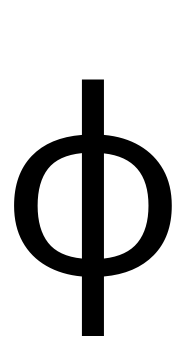 |
0x3D5 | GREEK PHI SYMBOL |
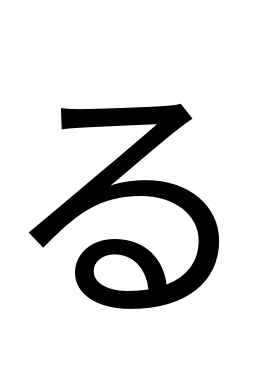 |
0x308B | HIRAGANA LETTER RU |
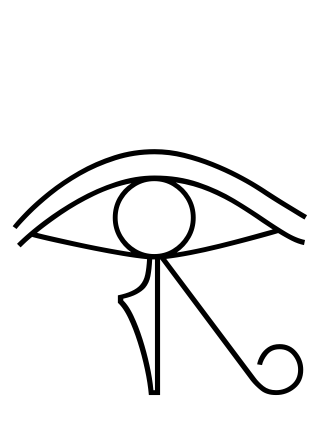 |
0x13080 | EGYPTIAN HIEROGLYPH D010 |
 |
0x1F602 | FACE WITH TEARS OF JOY |
-
a) A popular emoticon for expressing anger or outrage is the table-flip emoticon which depicts a person flipping over a table. There are many variations, including the following angry table-flip emoticon:

This emoticon consists of nine Unicode symbols with code points 0x30ce 0xca0 0x76ca 0xca0 0x30ce 0x5f61 0x253b 0x2501 0x253b. To familiarize yourself with the Unicode standard, look up the definitions of these symbols. Which languages or scripts do they come from?
Unicode text is often encoded in a format called UTF-8, which is backwards compatible with the common 8-bit encoding used for ASCII. In contrast to ASCII, however, UTF-8 is a variable-length code that represents all possible code points as a sequence of one to four bytes. To achieve this, UTF-8 partitions the possible code points into four ranges, with each range using a certain number of bytes:
| 0x0000 to 0x007F | 1 byte |
| 0x0080 to 0x07FF | 2 bytes |
| 0x0800 to 0xFFFF | 3 bytes |
| 0x10000 to 0x10FFFF | 4 bytes |
The details of the encoding are shown in Fig. 9.4. Each row shows the bit patterns that represent a certain range of code points. The most significant bits of each byte are fixed, whereas the lower bits marked with a period (“.”) are filled with the binary digits of the code point, from right to left. For example, the symbol “\(\phi \)” has the code point 0x3D5 and therefore falls into the second range. Since the binary representation of 0x3D5 is \(1111010101_2\), the UTF-8 encoding of \(\phi \) consists of the two bytes 11001111 and 10010101.
| Code points | Byte 1 | Byte 2 | Byte 3 | Byte 4 |
| 0x0000 to 0x007F | 0....... | – | – | – |
| 0x0080 to 0x07FF | 110..... | 10...... | – | – |
| 0x0800 to 0xFFFF | 1110.... | 10...... | 10...... | – |
| 0x10000 to 0x10FFFF | 11110... | 10...... | 10...... | 10...... |
-
b) Consider the “FACE WITH TEARS OF JOY” emoji with code point 0x1F602. What is the length of the UTF-8 encoding of this symbol? What is the resulting byte sequence?
-
d) Implement a function that translates Unicode codepoints into their UTF-8 encoding. Use this function to compute the UTF-8 encoding of the table-flip emoticon discussed in part (a) of this exercise.
Binary Coded Decimals
[9.15]Suppose you are given a long string of decimal digits, say the first 10 million digits of \(\pi \). How do you store these digits efficiently as a sequence of bits? Storing each digit as a full byte is clearly wasteful because it leaves 246 of the 256 possible bit patterns unused. A better solution is to use four bits to store each digit:
| symbol | \(0\) | \(1\) | \(2\) | … | \(9\) |
| codeword | 0000 | 0001 | 0010 | … | 1001 |
We can therefore fit two decimal digits into a single byte. Decimal numbers encoded in this way are known as binary-coded decimals (BCD).
-
a) Implement two functions for reading and writing binary coded decimals, for example using the following two function signatures:
static void writeBCD(int[] digits, int n, OutputStream out)
        throws IOException;
static void readBCD(InputStream in, int n, int[] result)
        throws IOException;
The first method encodes n decimal digits that are stored as ordinary integers in digits as BCDs and writes them to out. The second method reads n BCDs from in and stores them as integers in result. How do you handle an odd number of decimal digits?
The 4-bit encoding of BCDs still wastes 6 of the 16 possible bit patterns. One way to encode decimal digits even more efficiently is to use a variable-length codevariable-length codes.
-
b) Assume that every decimal digit occurs equally often and design the corresponding Huffman code. How many bits per digit does the resulting code require?
Another way to store decimal digits more efficiently is to encode groups of digits. For example, if we group the digits into pairs, there are 100 different pairs, from \(00\) to \(99\), and each of those 100 values can be encoded using 7 bits per pair, which gives us 3.5 bits per digit. Encoding decimal digits in triplets works even better: The 1000 different combinations of three digits can be encoded using 10 bits, so each digit requires only \(3.33\) bits. A group of three decimal digits is also called a declet.
-
c) Implement a function
void writeDeclets(int[] digits, int n, BitOutputStream out);
that encodes an array of decimal digits as declets. If the total number of digits is not a multiple of 3, devise a special encoding for the last one or two digits.
9.6 Chapter Notes
The theoretical foundations of storing and transmitting data are studied in information theory, a field whose foundations were laid by Claude E. Shannon in 1948 [87, 88]. Among the questions that are studied in information theory are: What is “information?” How can we model the exchange of information? How can we send messages using a minimal number of bits? Can we recover from errors made during the transmission?
Shannon did his work in the early days of telecommunication, but his theory also describes how computers store and transmit data. The problem of encoding information using the minimal number of bits is essentially data compression in disguise, and correcting errors that occur during transmission is a major research area in its own right known as coding theory. A good introduction to information and coding theory can be found in the first chapters of [67].
A central concept in information theory is a quantity called the entropy. The entropy \(H\) is a nonnegative number that measures the randomness or predictability of a signal. An important result in information theory is the source coding theorem, which states that the number of bits required to encode a signal is bounded from below by the entropy:
\(\seteqnumber{0}{9.}{1}\)\begin{equation*} H \le \text {bits per symbol}. \end{equation*}
(As the randomness of the signal increases, so does the entropy and the number of bits required.) In addition, binary codes that satisfy the inequality
\(\seteqnumber{0}{9.}{1}\)\begin{equation*} H \le \text {(bits per symbol)} < H + 1, \end{equation*}
can be shown to be theoretically optimal and called entropy codes. Huffman codes are the simplest example of such an entropy code; they were invented by David Huffman [53]. For more information on Huffman coding, see the survey by Moffat [70].
There are other entropy codes that often achieve even better compression rates than Huffman codes. Two such codes are widely used in practice: arithmetic coding [79] and asymmetric numeral systems [32].
As we discussed in the text, every prefix code can be decoded unambiguously, but the reverse isn’t true: as we saw in Exercise 9.6, there are unambiguous codes that aren’t prefix codes. The Sardinas-Patterson algorithm can be used to determine whether a code is unambiguous [83].