Chapter 6 Exploring Peg Solitaire
No one knows how many different ways there are
to solve the puzzle leaving
the last counter in the center.
— Martin Gardner [40]
Peg solitaire is a well-known board game with a long history. Today, the most common version of the game is played on a board with 33 holes that are arranged in cross-like shape as shown in Fig. 6.1. At the start of the game, every hole except for the one in the center contains a marble or a wooden peg, and the goal is to find a sequence moves that inverts the board so that only a single peg in the center remains.
The only allowed move in peg solitaire is to jump one of the pegs over an adjacent peg into a hole. The peg that was jumped over is removed from the board and creates a new hole, so each move transforms a vertical or horizontal arrangement of the form “XXO” (two pegs and one hole) into “OOX” (two holes and one peg). Since each jump removes one peg, every valid solution requires exactly 31 jumps. The question is: Are there any solutions? If yes, how many? And how do we find them?
6.1 Representing Boards
Let’s start with a simple problem: How do we store the state of the game? One solution is to enumerate the board as shown in Fig. 6.2 and represent the positions of pegs or holes as sets of integers. For example, the set of all valid positions on the board can be represented by the following set:
\(\seteqnumber{0}{6.}{0}\)\begin{equation*} \text {(full board)} = \{ 2, 3, 4, 9, 10, 11, 14, \dots , 34, 37, 38, 39, 44, 45, 46\} \end{equation*}
In the starting configuration, there is a peg in every hole except the one in the center, so the corresponding set consists of all valid positions except the 24th:
\(\seteqnumber{0}{6.}{0}\)\begin{equation} \text {(initial board)} = \text {(full board)} - \{ 24 \}. \end{equation}
Likewise, the final state of the game has a single peg in the center and therefore has the set representation \(\{ 24 \}\). At the start of the game, the only possible move is to jump to the empty hole in the center, and the only four pegs that can jump there are the ones at positions 10, 22, 26, and 38; the set of pegs that can be moved can be written as \(\{ 10, 22, 26, 38 \}\).
One advantage of this representation is that every such set can be stored very compactly a sequence of 49 bits in which the \(k\)th bit indicates whether there is a peg at position \(k\). (Of course, set of holes can be represented in the same way.) The term bitboard is often used for the resulting data structure. We collect a few basic functions for working with these bitboards in a class called PegBoard, which is outlined in Listing 6.1. We start by defining three constants: FULL_BOARD is the set of all valid positions on the board, INIT_PEGS is the initial configuration of pegs, and FINAL_PEGS is the desired final configuration of pegs.
Listing 6.1ch6 / PegBoard
public class PegBoard {
    public static long FULL_BOARD = Bits.range(2, 5)
            | Bits.range(9, 12) | Bits.range(14, 35)
            | Bits.range(37, 40) | Bits.range(44, 47);
    public static long INIT_PEGS = FULL_BOARD & ~Bits.bit(24);
    public static long FINAL_PEGS = Bits.bit(24);

    // ...
}
How can we perform a single jump in this representation? Assume we are given the current position of all pegs as a bit set board and two integers peg and hole that indicate which peg to move into which hole. With our numbering scheme, we can compute the index mid of the peg that is jumped over by averaging peg and hole. The resulting board is obtained by removing the two pegs at peg and mid and adding a new peg at hole; alternatively, we can flip the corresponding three bits using a single exclusive OR operation, as shown in Listing 6.2.
Listing 6.2ch6 / PegBoard
public static long jump(long board, int peg, int hole) {
    int mid = (peg + hole) / 2;
    return board ^ Bits.bits(peg, mid, hole);
}
Bitboards
We now come to the main advantage of using bit sets to store sets of board positions, namely the ability to use bit operations to modify all set elements at once. Consider the problem of moving individual pegs or groups of pegs. We can move a single peg to the right or left by adding \(\pm 1\) to its index and up or down by adding \(\pm 7\). If the positions of multiple pegs are stored in a bitboard, we can move them all at once by shifting the bit pattern by \(\pm 1\) or \(\pm 7\) places!
This trick works for most but not all positions on the board. For example, if you try to move the peg at position 21 to the left by subtracting 1, you end up with position 20 on the opposite side of the board. In general, we have to be careful with positions on the boundary of the board.
Fortunately, bitboards give us an easy way to handle this special case as well: All we have to do is remove the problematic positions before performing the bit shift. For example, we can safely move a bitboard to the left if we first remove the positions on the left boundary, which can be done by subtracting the set \(\{2, 9, 14, 21, 28, 37, 44\}\). The left() function in Listing 6.3 implements this operation, using the expression board & ~BOUNDARY_LEFT to compute the set difference of board and BOUNDARY_LEFT. If p is a set of positions on the board, left(p) is the set of positions to the left of p and left(left(p)) the set of positions two steps left of p.
Listing 6.3ch6 / PegBoard
static long BOUNDARY_LEFT = Bits.bits(2, 9, 14, 21, 28, 37, 44);
static long left(long board) {
    return (board & ~BOUNDARY_LEFT) >>> 1;
}

static long BOUNDARY_RIGHT = Bits.bits(4, 11, 20, 27, 34, 39, 46);
static long right(long board) {
    return (board & ~BOUNDARY_RIGHT) << 1;
}

static long up(long board) {
    return (board >>> 7) & FULL_BOARD;
}

static long down(long board) {
    return (board << 7) & FULL_BOARD;
}
In a similar manner, we can define functions right(), up() and down() that move game boards in the other three directions. For the implementation of right(), we replace the right shift with a left shift and remove bits on the opposite boundary. Moving the board up and down can be accomplished by shifting the bitboard 7 places to the left or right. In this case, it isn’t possible for bits to wrap around to the opposite side of the board, so can simply remove invalid positions from the bitboard after shifting the bits.
We can use these four functions to define more advanced operations on bitboards. For instance, given a set of positions, the set of all neighboring positions on the board is the union of positions obtained by moving in the four possible directions:
static long neighbors(long positions) {
    return left(positions) | right(positions)
        | up(positions) | down(positions);
}
If positions contains just a single bit, neighbors() computes its direct neighbors:
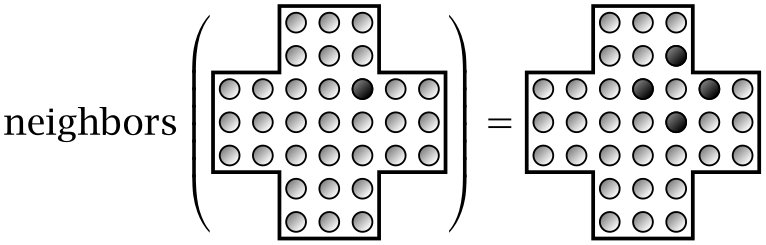
But if multiple bits are set, it returns the union of all direct neighbors:
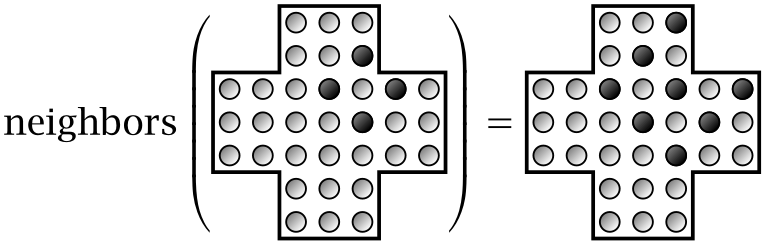
That’s the main benefit of bitboards: They make it possible to express many computations involving sets of positions using just a handful of bit operations.
Computing Possible Moves
We can also use bitboards to quickly compute the set of pegs that are currently movable, that is, the set of pegs that are two places away from a hole with another peg between them. Let’s start with a single direction first: Given a set pegs that contains all pegs that are currently on the board, which subset of these pegs can jump to the left?
First we compute the subset of pegs that have another peg to their left. This is obviously the same as the subset of pegs that are to the right of another peg, which we can compute by moving all pegs to the right and computing the intersection with the original pegs:
It’s helpful to mentally translate expressions of the form pegs & X into “pegs that have some property X.” Here, the mental translation is “pegs that are to the right of another peg.”
We can use the same idea to compute the set of pegs that are to the right of a hole. The set of holes can be computed by subtracting pegs from FULL_BOARD, which effectively inverts the current board:
We then compute the set of pegs directly to the right of a hole by moving all holes and computing the intersection with pegs:
By combining the two expressions we obtain the set of pegs that are to the right of a peg that is to the right of a hole — in other words, the set of pegs that can jump to the left.
In the same way, we can compute the sets of pegs that can jump in any of the three other directions, and the union of these four sets gives us the set of all pegs that can be moved:
(pegs & down(pegs & down(holes)))
    | (pegs & up(pegs & up(holes)))
    | (pegs & right(pegs & right(holes)))
    | (pegs & left(pegs & left(holes)))
This expression can be simplified further by “factoring out” the common term “pegs &”. This is possible because the bit operators ‘|’ and ‘&’ satisfy distributive laws similar to those of addition and multiplication; see Exercise 6.2. This gives us the final expression for the subset of movable pegs:
movablePegs = pegs & (down(pegs & down(holes))
    | up(pegs & up(holes))
    | right(pegs & right(holes))
    | left(pegs & left(holes)))
Another problem can be solved in almost the same way: Given a single peg on the board, how can we determine where it can jump to? To test whether the peg can jump in a particular direction, we simply check whether there is first another peg and then a hole in that direction. Repeat this for all four directions and you have the list of possible moves. Alternatively, we can again use bit operations to determine all possible destinations in one go. If position is a bit set that contains just the peg we are interested in, we can compute the set of reachable holes using an expression that is almost identical to the one we used to compute the set of movable pegs:
reachableHoles = holes & (down(pegs & down(position))
    | up(pegs & up(position))
    | right(pegs & right(position))
    | left(pegs & left(position)))
This expression moves position in all four directions, keeping only those positions that have another peg at distance 1 and a hole at distance 2. The result is a bit set containing all holes that are reachable from position. (If position doesn’t contain a single peg but an arbitrary subset of pegs, the expression returns the union of all reachable holes.)
As you can see, the bit expressions for movablePegs and reachableHoles are almost identical, so we factor out the common part that computes the reachable positions that are one jump away, which gives us the function reachablePositions() shown in Listing 6.4. Using this function, we can then easily compute the set of pegs that are currently movable and the holes that are reachable from a set of positions. The set of movable pegs is simply the subset of pegs that are one jump away from a hole (movablePegs()), and the set of reachable holes is the subset of holes that are one jump away from the positions of interest (reachableHoles()).
Listing 6.4ch6 / PegBoard
// Compute all positions that can be reached from the positions
// in 'start' by jumping over an adjacent peg.
static long reachablePositions(long pegs, long start) {
    return down(pegs & down(start))
            | up(pegs & up(start))
            | right(pegs & right(start))
            | left(pegs & left(start));
}

// Compute the subset of 'pegs' that are movable.
public static long movablePegs(long pegs) {
    long holes = FULL_BOARD & ~pegs;
    return pegs & reachablePositions(pegs, holes);
}

// Compute the set of holes that can be reached from the pegs
// in 'start'.
public static long reachableHoles(long pegs, long start) {
    long holes = FULL_BOARD & ~pegs;
    return holes & reachablePositions(pegs, start);
}
Using these two functions, we can now analyze a given game state and determine all possible moves. For example, consider the game state shown in Fig. 6.3. To compute the possible moves for this state, we first call movablePegs() to obtain the positions of all pegs for which any move exists, and then use reachableHoles() to determine the eligible target positions for each of them:
long pegs = Bits.bits(
        2, 3, 4, 9, 10, 14, 15, 16, 17, 19, 20, 21, 22, 23,
        24, 25, 27, 28, 29, 30, 32, 33);
for (int movable : Bits.iterate(PegBoard.movablePegs(pegs))) {
    long reachable = PegBoard.reachableHoles(pegs, Bits.bit(movable));
    System.out.printf("%d: %s%n", movable,
            Bits.toList(reachable));
}
JDK: System
•Bits: bit(), bits(), iterate(),
toList()
•PegBoard: movablePegs(), reachableHoles()
This outputs the following list of positions:
9: [11]
16: [18]
17: [31]
20: [18, 34]
23: [37]
24: [26]
25: [39]
29: [31]
32: [18, 34]
33: [31]
The first number in each row is the position of a movable peg, and the list of numbers in square brackets are the holes this peg can reach in a single jump. For example, the pegs at positions 20 and 32 can both jump to the holes at positions 18 and 34, whereas only a single move is available for the pegs at positions 9 and 16.
Exercises
[6.1]What does the following expression compute, when board is a bit set of peg positions?
reachableHoles(board, movablePegs(board))
⋆ [6.2]Prove the following distributive laws that hold for arbitrary bit patterns \(A\), \(B\), and \(C\):
\(\seteqnumber{0}{6.}{1}\)\begin{align*} A\AND (B\OR C)&=(A\AND B)\OR (A\AND C)\\ A\OR (B\AND C)&=(A\OR B)\AND (A\OR C). \end{align*} Hint: Consider individual bits first.
[6.3]The following image shows a variation of peg solitaire that is played on a triangular board:
As before, pegs are removed by jumping over adjacent pegs, but now there are six directions of movement.
-
a) Find a solution to the board shown above.
-
b) Explain how to store this board using bits and how to compute all legal jumps.
[6.4]Connect 4 is a two-player game that is played on an upright board that consists of 7 columns and 6 rows. Both players start with 21 tokens of a certain color, say white for the first player and black for the second, and take turns dropping tokens into the columns of the board. The first player to complete a vertical, horizontal, or diagonal line of four tokens wins the game. Figure 6.4 shows a game state in which the white player has won after eight moves.
Explain how to represent the game state using bitboards and how to quickly determine whether there are four identically colored tokens in a line somewhere on the board.
6.2 Backtracking
Now that we know how to represent boards and analyze possible moves, we can turn to the problem of assembling these moves into solutions that lead from INIT_BOARD to FINAL_BOARD. The simplest algorithm for systematically finding such solutions is based on a recursive strategy known as backtracking.
Backtracking is a general procedure for generating all possible arrangements of certain objects — in our case, the various sequences of moves that can be performed in peg solitaire. Every backtracking algorithm has the same overall structure: Given a partial solution current, the idea is to use recursion to exhaustively explore all possible solutions that start with current. In pseudocode, this looks as follows:
backtrack(current) {
    if (current == desired solution) {
        print("Solution found: " + current)
    } else {
        for (next : states reachable from current)
            backtrack(next)
    }
}
The use of recursion ensures that returning from the function automatically “backtracks” to the last partial solution that needs to be explored further.
It’s easy to adapt this general scheme to our problem of generating all possible solutions of peg solitaire. Each partial solution current is now the current state of the board, and the states that are reachable from current are the boards that are obtained by making a single jump:
solveBoard(current) {
    if (current == FINAL_BOARD) {
        print("Solution found")
    } else {
        for (next : boards reachable from current in a single jump)
            solveBoard(next)
    }
}
As illustrated in Fig. 6.5, this backtracking algorithm explores the possible states of the game in a hierarchical manner and forms a tree as it progresses; since the full tree is astronomically large, we only show a few of its nodes. Each node corresponds to a particular game state, the children of each node are the states that can be reached by making a single jump, and edges between nodes indicate recursive function calls made by the algorithm. Backtracking starts at the root of the tree on the left and picks one of the four reachable states, such as the one labeled \(A\). It then explores \(A\) and the entire subtree beneath it recursively. Once that is done, the algorithm returns to the game states \(B\), \(C\), and \(D\) in the second column, which are then explored in the same manner.
When backtracking is used to traverse tree-like structures, the resulting algorithm is also referred to as depth-first search since each subtree is explored “in depth” before any of its siblings. In the following chapter, we will examine a related technique called breadth-first search, which can be used to explore trees level by level.
Listing 6.5 shows one possible implementation of the backtracking algorithm for solving peg solitaire. We use two nested for loops to generate the possible jumps: The first one iterates over the movable pegs and the second one over the reachable holes for each peg. We then try each possible jump recursively. The member variable jumpList stores the current sequence of jumps as a nested list of integers; each entry in this list is a pair of integers (peg, hole) that indicates which peg was moved to which hole. New entries are added to jumpList before each recursive call to printSolutions() and removed immediately afterward.
Listing 6.5ch6 / PegSolve
private final List<List<Integer>> jumpList = new ArrayList<>();

public void printSolutions(long pegs) {
    if (pegs == PegBoard.FINAL_PEGS) {
        System.out.println(jumpList);
        return;
    }
    for (int movable : Bits.iterate(PegBoard.movablePegs(pegs))) {
        long reachable =
                PegBoard.reachableHoles(pegs, Bits.bit(movable));
        for (int hole : Bits.iterate(reachable)) {
            jumpList.add(List.of(movable, hole));
            printSolutions(PegBoard.jump(pegs, movable, hole));
            jumpList.remove(jumpList.size() - 1);
        }
    }
}
JDK: List, System
•Bits: bit(), iterate()
•PegBoard: FINAL_PEGS, jump(), movablePegs(), reachableHoles()
We can now solve peg solitaire by calling printSolutions() with INIT_PEGS as the starting configuration:
The program quickly finds the first solution and continues to generate several hundred solutions per second. Here are the first two lines of the output:
[[10, 24], [15, 17], [2, 16], [4, 2], [17, 15], [14, 16], [18, 4],
 [20, 18], [23, 9], [2, 16], [21, 23], [23, 9], [25, 11], [4, 18],
 [27, 25], [25, 11], [37, 23], [28, 30], [30, 16], [9, 23],
 [23, 25], [32, 18], [11, 25], [34, 32], [31, 33], [46, 32],
 [25, 39], [44, 46], [46, 32], [33, 31], [38, 24]]
[[10, 24], [15, 17], [2, 16], [4, 2], [17, 15], [14, 16], [18, 4],
 [20, 18], [23, 9], [2, 16], [21, 23], [23, 9], [25, 11], [4, 18],
 [27, 25], [25, 11], [37, 23], [28, 30], [30, 16], [9, 23],
 [23, 25], [32, 18], [11, 25], [34, 32], [31, 33], [46, 32],
 [44, 46], [25, 39], [46, 32], [33, 31], [38, 24]]
...
As you can see, the two solutions are almost identical and differ only in the order of the last few jumps. This is a general characteristic of peg solitaire: Once you have found one solution, you can usually generate many more by reordering jumps that are independent of each other.
6.3 Counting Solutions
As we saw in the previous section, solving peg solitaire using backtracking is fairly easy. In the following we will see why this is the case: There are so many solutions that it’s hard not to stumble upon them while mindlessly trying all possible moves. How many solutions are there exactly? Let’s find out.
We start with a simple variation of the backtracking algorithm used in the previous section, except that we now count the solutions instead of printing them:
int countSolutions(current) {
    if (current == FINAL_BOARD) {
        return 1
    } else {
        int n = 0
        for (next : boards reachable from 'current' in a single jump)
            n += countSolutions(next)
        return n
    }
}
The function returns the number of solutions that are reachable from current. If current is itself the solution, countSolutions() returns 1. Otherwise, it counts the number of solutions that start with one of the possible next jumps and then returns their sum.
Unfortunately, peg solitaire has so many solutions that this simple version of countSolutions() doesn’t complete in any reasonable amount of time. To make the problem more tractable, we will use two techniques: normalization, which simplifies computations by choosing a single, unique representation for game states that are equivalent; and memoization, which is a general method for speeding up recursive computations by tabulating the results of previous computations. Let’s see how they work and why they are so effective in this case.
Normalization
Many puzzles have symmetries we can exploit to reduce the number of moves or alternatives we have to consider. This is also true for peg solitaire. For example, the four different boards that can be reached with the first jump (shown in the second level of the tree in Fig. 6.5) differ only in their orientation, so each of them must lead to the same number of solutions. We can therefore speed up countSolutions() by choosing one of the possible four jumps in the first step, computing the resulting number of possible solutions, and then returning four times this number — without investigating the other three possible jumps at all.
It’s easy to generalize this idea to any board configuration. We first note that rotation isn’t the only kind of symmetry we can exploit: All boards that can be obtained by rotation, vertical or horizontal reflection, or any combination thereof have the same number of solutions, provided we are searching for a solution with the final peg in the center of the board. As illustrated in Fig. 6.6, this gives us a maximum of eight configurations that can be considered equivalent: the four rotations we already discussed and their reflections. (Both horizontal and vertical reflections produce the same four states in the bottom row, albeit in a different order.)
The idea behind normalization is to choose a unique instance from the eight configurations in Fig. 6.6, thereby making it easier to detect boards that have already been investigated. For boards that are stored as bit sets, the easiest way to choose a unique representative is to compute the minimum of the corresponding integers. The normalize() method in Listing 6.6 performs this normalization by rotating and mirroring a given bitboard in all possible ways and keeping track of the one that is numerically smallest. In our case, the numerically smallest bitboard is the one with holes at the largest indices; in Fig. 6.6 this is the board in the lower right.
Listing 6.6ch6 / PegCount
// Map 'board' to a unique representative from all equivalent
// rotated and flipped boards.
static long normalize(long board) {
    long result = Math.min(board, flipH(board));
    long rot90 = rotate(board);
    result = Math.min(result, Math.min(rot90, flipH(rot90)));
    long rot180 = rotate(rot90);
    result = Math.min(result, Math.min(rot180, flipH(rot180)));
    long rot270 = rotate(rot180);
    result = Math.min(result, Math.min(rot270, flipH(rot270)));
    return result;
}
To implement rotate() and flipH(), we first note that both operations can be described by moving each bit to a new position. We use two arrays to specify the new positions of each bit (Listing 6.7): FLIP_H mirrors each row of the board horizontally and ROTATE rotates it counterclockwise. The \(k\)th entry in each array indicates the target position of the \(k\)th peg. After defining these permutation tables, we reorder the bits by calling shuffleBits(). What do we do with the normalized boards we just constructed? This is where the second technique, memoization, comes in.
Listing 6.7ch6 / PegCount
private static byte[] FLIP_H = {
        6, 5, 4, 3, 2, 1, 0,
        13, 12, 11, 10, 9, 8, 7,
        20, 19, 18, 17, 16, 15, 14,
        27, 26, 25, 24, 23, 22, 21,
        34, 33, 32, 31, 30, 29, 28,
        41, 40, 39, 38, 37, 36, 35,
        48, 47, 46, 45, 44, 43, 42
};

private static byte[] ROTATE = {
        6, 13, 20, 27, 34, 41, 48,
        5, 12, 19, 26, 33, 40, 47,
        4, 11, 18, 25, 32, 39, 46,
        3, 10, 17, 24, 31, 38, 45,
        2, 9, 16, 23, 30, 37, 44,
        1, 8, 15, 22, 29, 36, 43,
        0, 7, 14, 21, 28, 35, 42
};

public static long flipH(long board) {
    return shuffleBits(board, FLIP_H);
}

public static long rotate(long board) {
    return shuffleBits(board, ROTATE);
}

// Reorder bits by moving each one to a new position.
private static long shuffleBits(long bits, byte[] targetIndex) {
    long result = 0L;
    for (int i : Bits.iterate(bits))
        result |= Bits.bit(targetIndex[i]);
    return result;
}
Memoization
Memoization is a programming technique for speeding up expensive functions by caching the results from previous calls in an auxiliary data structure. Effectively, memoization is a method for tabulating a given function on demand: we don’t have to know beforehand which function arguments actually occur in practice but simply tabulate those that do occur when they occur.
Memoization can be used for both recursive and non-recursive functions. If F is a non-recursive function that depends on a single parameter x, we can create a memoized version of this function by wrapping it in a new function memoizeF that uses an auxiliary data structure cache to quickly return the results of previous calls without repeating the actual computation:
memoizeF(x) {
    if (!cache.contains(x))
        cache[x] = F(x)
    return cache[x]
}
If cache already contains a value for the argument x it is returned directly; otherwise, the original function F(x) is called and cache is updated with the result.
For recursive functions, we have to interleave the memoization logic with the implementation of the recursive function. It’s easiest to see how this works by considering a concrete example. The factorial function \(n!\) is defined recursively as
\(\seteqnumber{0}{6.}{1}\)\begin{align*} 0! &= 1\\ n! &= n\cdot (n-1)! \end{align*} To implement a memoized version of this function, we first define a hash map cache to store previous results and then define a factorial() method as shown in the following listing:
static HashMap<Integer, Integer> cache = new HashMap<>();
static int factorial(int n) {
    if (n == 0)  // base case
        return 1;
    if (!cache.containsKey(n))
        cache.put(n, n * factorial(n - 1));
    return cache.get(n);
}
As you can see, the memoized version of a recursive function is still recursive, but redundant function calls are avoided by caching previous results.
In principle, memoization be used with any pure function, that is, a function whose return value depends only on its arguments and that doesn’t have any side effects. In addition, memoization works best if the function is sufficiently expensive to compute and if it is called repeatedly with the same arguments: There is little value in tabulating simple arithmetic expressions or functions that are called only once. The main downside of the technique is that that the tables produced by memoization can consume a significant amount of memory.
Let’s see how to use memoization to speed up the countSolutions() function for counting the solutions of peg solitaire. Both prerequisites mentioned above are satisfied: The function is expensive to compute (at least for boards that contain more than a handful of pegs) and the same boards are evaluated over and over again, both naturally (because there are often several different sequences of moves that lead from one board to another), and even more so if we also use normalization to merge game states that are considered equivalent. To implement memoization, we use a hash table that maps boards (long integers in bit representation) to the number of possible solutions (because this number can grow large, we use long integers here as well). The resulting implementation of countSolutions() is shown in Listing 6.8.
Listing 6.8ch6 / PegCount
private static HashMap<Long, Long> numSolutions = new HashMap<>();

public static long countSolutions(long board) {
    if (board == FINAL_PEGS)
        return 1;
    long normalized = normalize(board);
    if (numSolutions.containsKey(normalized)) {
        return numSolutions.get(normalized);
    } else {
        long n = 0;
        for (int movable : Bits.iterate(movablePegs(board))) {
            var holes = reachableHoles(board, Bits.bit(movable));
            for (int hole : Bits.iterate(holes))
                n += countSolutions(jump(board, movable, hole));
        }
        numSolutions.put(normalized, n);
        return n;
    }
}
•Bits: bit(), iterate()
•PegBoard: FINAL_PEGS, jump(), movablePegs(), reachableHoles()
•PegCount: normalize()
We can now determine the total number of solutions as follows:
On the author’s computer, the function completes in just a few minutes. The result? For the standard peg solitaire board there are 40 861 647 040 079 968, or approximately 41 quadrillion, unique solutions.
This raises an interesting questions: If solutions are so plentiful, why do human players still find peg solitaire moderately difficult? The main reason is (ironically) that the number of solutions is only 41 quadrillion — a tiny number compared to the vast number of possible ways to play the game. As we will discuss in Exercise 6.6, most boards that are reachable from the starting configuration are unwinnable. If you play peg solitaire without some kind of strategy, you are therefore likely to end up in a dead end.
Exercises
[6.5]Estimate how long it would take a modern computer to generate all 41 quadrillion solutions of peg solitaire.
[6.6]How many distinct boards does the call
encounter? What fraction of those boards are actually winnable?
[6.7]Write a program that uses memoization to compute the Fibonacci sequence
\(\seteqnumber{0}{6.}{1}\)\begin{align*} F_0 &= F_1 = 1,\\ F_n &= F_{n-1}+F_{n-2},\quad \text {for $n\ge 2$.} \end{align*}
[6.8]The interface Function
Any additional call to apply(1) should return the cached result.
6.4 Problems
Nim
[6.9]Nim is a simple two-player game that is played with piles of coins or other small objects. A common version is 3,4,5-Nim in which there are three piles of 3, 4, and 5 coins:
The players alternately remove one or more coins from a single pile. For example, if the first player removes three coins from the second pile, we end up with the following position:
The player who removes the last coin wins.
What is a good strategy for playing Nim? More specifically, is there a winning strategy, that is, a strategy that leads to a guaranteed win, regardless of how the opponent plays? Let’s start our analysis with with a few simple instances of Nim. If there is a single pile of \(n\) coins, the first player obviously wins by taking all \(n\) coins, but taking fewer coins is risky because it gives the second player a chance to take all remaining coins. Taking all coins is therefore the only winning strategy for Nim with a single pile.
-
a) Study \(n,m\)-Nim in which there are two piles of \(n\) and \(m\) coins respectively. Try to find winning strategies for a few small values of \(n\) and \(m\).
Since every move in Nim leads to a position with fewer coins, we can use recursion to determine whether there is a winning strategy for the current position. Let’s define a function \(W\) that determines whether a position is winnable. Continuing with the example of \(n,m\)-Nim, this strategy can be formulated as follows. If there are no coins left when our turn begins, we lose, so we set
\(\seteqnumber{0}{6.}{1}\)\begin{equation*} W(0, 0) = \mathsf {F}. \end{equation*}
(We use the symbols \(\mathsf {T}\) and \(\mathsf {F}\) to represent true and false, respectively.) Other positions are winnable if at least one of the possible next moves leads to a position that is not winnable for the opponent. If the current state is \((n,m)\), there are \(n+m\) possible next moves, which lead to the following states:
\(\seteqnumber{0}{6.}{1}\)\begin{equation*} (n-1,m), (n-2,m), \ldots , (0, m), (n, m-1), (n,m-2),\ldots , (n,0). \end{equation*}
We can win the game if at least one of these states is not winnable (for the opponent), in other words if
\(\seteqnumber{0}{6.}{1}\)\begin{multline} \label {eq:pegwin} W(n, m) = \neg W(n-1, m) \lor \neg W(n-2,m)\lor \ldots \lor \neg W(0,m)\\ \lor \neg W(n, m-1)\lor \neg W(n, m-2)\lor \ldots \lor \neg W(n, 0) \end{multline} For example, Eq. (6.2) tells us that \((1,0)\) is a winning position because
\(\seteqnumber{0}{6.}{2}\)\begin{align*} W(1,0) &= \neg W(0,0) = \neg \mathsf {F} = \mathsf {T}. \end{align*} On the other hand, \((1,1)\) is not a winning position because
\(\seteqnumber{0}{6.}{2}\)\begin{align*} W(1, 1) &= \neg W(0, 1) \lor \neg W(1,0) = \neg \mathsf {T} \lor \neg \mathsf {T} = \mathsf {F}. \end{align*} Here we have used the fact that the stacks of coins are interchangeable, so \(W(0,1)=W(1,0)\). As the number of coins and piles increases, the number of terms that must be considered grows rapidly.
-
b) Manually evaluate \(W(1,1,2)\).
-
c) Implement a recursive function that determines whether a given Nim position is winnable. The function should work with any number of piles and coins. Is the position \(10,5,4,3\) winnable for the current player? What moves are possible? Hint: Use normalization and memoization.
The mathematical theory behind Nim was first studied by Charles L. Bouton in 1901. Bouton showed that there is a winning strategy for any number of piles and coins and derived a simple non-recursive procedure for determining the winner. His main idea was to write the number of coins in each pile as a binary number and add them without carry. The position is winning if and only if the result is nonzero. For example, when the number of coins is \((1,3,7)\), we obtain the sum
\(\seteqnumber{0}{6.}{2}\)\begin{equation*} \begin{array}{ccc@{\extracolsep {1cm}}l} 0 & 0 & 1 & =1\\ 0 & 1 & 1 & =3\\ 1 & 1 & 1 & =7\\ \midrule 1 & 0 & 1 & \text {sum, ignoring carries}\\ \end {array} \end{equation*}
Since the result is 101 and not zero, \((1, 3, 7)\) must be a winning position. The binary sum without carries is also called the Nim sum and is equivalent to the XOR operation.
-
d) Are \((2,5,6)\) and \((2,5,7)\) winning positions?
-
e) Write a program that uses Nim sums to find all winning moves for a given position. What are the winning moves for \((3,6,6)\)?
Solving Sudoku
[6.10]Sudoku is a popular puzzle that is played on a \(9\times 9\) board. Some of the board’s cells already contain digits. The objective is to fill the remaining cells with digits between 1 and 9 so that every row, column, and \(3\times 3\) block contains each digit exactly once. Sudoku puzzles are usually designed in such a way that there is exactly one solution that satisfies these conditions.
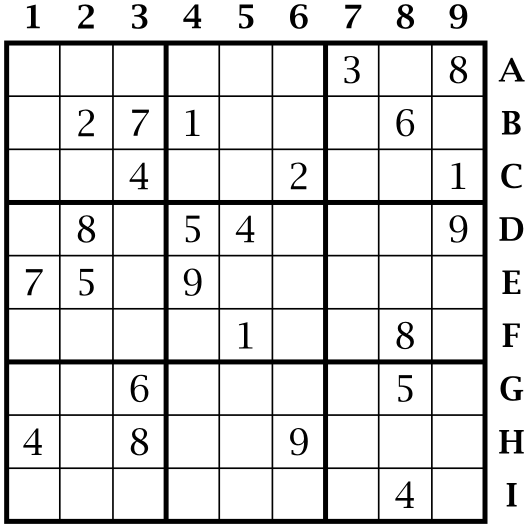
For the Sudoku board shown in Fig. 6.7, 24 of the 81 digits are given and the values of the remaining 57 digits must be found. Some numbers are easy to determine. For instance, it’s not hard to see that the square labeled A8 must be 2: We know that this digit must occur somewhere in the top-right square, but rows B and C are blocked because there is already a 2 in squares B2 and C6, so the only remaining position is A8. Similar arguments can be used to successively fill in the remaining squares.
-
a) Manually solve the Sudoku board in Fig. 6.7.
Even though there are specialized algorithms for solving Sudoku and similar puzzles efficiently, modern computers are fast enough that a simple backtracking approach is viable as well.
-
b) Write a program that uses backtracking to solve a given Sudoku puzzle. Hint: Design a data structure that lets you keep track of the allowed digits in each cell.
6.5 Chapter Notes
Countless variations of peg solitaire can be obtained by changing the geometry of the board and the initial and final positions of the pegs [40, 11]. New and interesting questions also arise if we shift our focus from individual jumps to sequences of jumps. For instance, if we treat successive jumps with a single peg as a single move, how many such moves are necessary to clear the entire board? The answer is 18, and finding the corresponding solution is left as an exercise for the reader.
This chapter was inspired by an article by Bell [12]. There are also strategies for solving peg solitaire that do not rely on trial and error or brute computational force; for an overview, see the book by Berlekamp et al. [15, Chapter 23].
Problems that involve searching or analyzing arrangements of objects are called combinatorial problems. Sometimes the goal is to find a certain specimen among all possible arrangements, for example when playing the lottery or trying to crack a combination lock. Other times, we consider the entirety of arrangements: How many different solutions does peg solitaire have, or what is the total number of different chess games?
Our discussion of peg solitaire highlighted an issue that plagues many combinatorial problems: Small instances of the game are easy to analyze, but as we increase the number of pegs, the number of possible solutions grows so quickly that it becomes impossible to generate them all using “brute force.” This phenomenon is known as combinatorial explosion, and it occurs in almost every situation in which we investigate arrangements of objects. Whenever there is more than one way to choose an object for each position in the arrangement, the total number of combinations grows at least exponentially, quickly outpacing the capabilities of even the most powerful computers.
The extraordinary speed of exponential growth is illustrated in Fig. 6.8. The lower four curves are growth rates that are commonly encountered in computer science. As the size of \(n\) increases along the horizontal axes, these functions show a moderate growth. (Both axes are logarithmic so the quadratic growth \(n^2\) appears as a line.) In contrast, the growth of the exponential function \(2^n\) is constantly accelerating and quickly reaches astronomical values.
We used bitboards to represent the different configurations of pegs and holes in peg solitaire. Similar techniques can be used in many other puzzles that involve the placement or movement of pieces on a board. A natural example is chess, where the 64 squares of the board naturally map to the 64 bits of a long integer. A slight complication in this case is that chess pieces come in two colors and six different types: kings, queens, rooks, bishops, knights, and pawns. If we use one bitboard for each type of piece, we can represent the complete state of a chessboard using twelve bitboards. Bitwise techniques can then be used to quickly perform many important operations, such as computing possible moves or checking which pieces threaten other pieces. A popular open-source chess engine that uses bitboards is Stockfish (https://stockfishchess.org/). For a survey of bitboard techniques similar to the ones discussed in this chapter, see the article by Browne [21].
The game Nim, which we discussed in Exercise 6.9, was first described in 1901 by the American mathematician Charles L. Bouton [19]. Nim is one of the simplest examples of what mathematicians call a combinatorial game, a two-player game that doesn’t involve chance and in which both players have complete information about the state of the game. Other popular examples of combinatorial games are tic-tac-toe, Connect 4, checkers, and chess. For every combinatorial game, we can ask whether there is a winning strategy that guarantees a victory even if the opponent plays optimally. In the paper cited above, Bouton showed that there is an optimal strategy for playing Nim. The field of combinatorial game theory extends this analysis to a wide range of other games [3].
We saw that the winning strategy for Nim can be implemented using just a few XOR operations, which made it possible to construct Nim-playing machines several years before the development of electronic computers. The first such machine was the Nimatron, a massive electro-mechanical device that was showcased at the World’s Fair in New York in 1940, where it managed to win 90 % of the 100 000 games it played [80].
The main technique we used to solve combinatorial problems in this chapter was backtracking, which tries all possible steps or moves until it happens upon a suitable solution. Modern computers are so fast that backtracking alone can solve most simple combinatorial puzzles, but if the number of possible moves grows too large, the number of potential solutions becomes prohibitive and more sophisticated algorithms must be tried to reduce the amount of trial-and-error required.
In the case of Sudoku, two approaches are especially noteworthy. Both convert each Sudoku puzzle into a constraint satisfaction problem (CSP), which consists of a set of variables whose values we wish to determine (in our case, the numbers in the squares of the Sudoku board) and a set of constraints those variables must satisfy (which include both the rules of the game and the existing numbers on the board).
One algorithmic technique for solving or at least simplifying such problems is known as constraint propagation [72]. This approach resembles the way humans solve Sudoku puzzles: If we know the number in a particular square, we can “propagate” this knowledge to constrain the range of allowed numbers of other squares in the same row, column, and block; we then repeatedly propagate these new constraints in the same way.
The second approach is to translate the problem into a Boolean formula and then search for a set of variables that satisfies this formula. Let’s use the variable \(x_{ijk}\) to indicate that the square in row \(i\) and column \(j\) has value \(k\) and its negation \(\bar x_{ijk}\) that the value is not \(k\). With this convention, we can encode the initial state of the board and the general rules of the game using Boolean formulas. For example, the formula
\(\seteqnumber{0}{6.}{2}\)\begin{equation*} x_{A33} \land x_{A98} \land x_{B22} \land x_{B37} \land x_{B41} \land x_{B86} \end{equation*}
encodes the first two rows of the Sudoku board in Fig. 6.7 and the formula
\(\seteqnumber{0}{6.}{2}\)\begin{equation*} x_{A1k} \land \bar x_{A2k} \land \bar x_{A3k} \land \bar x_{A4k} \land \bar x_{A5k} \land \bar x_{A6k} \land \bar x_{A7k} \land \bar x_{A8k} \land \bar x_{A9k} \end{equation*}
states that if the value of the square A1 is \(k\), no other square in row A can have that value. If we combine all these constraints into a single expression, we obtain a single large Boolean formula of the \(9^3\) variables \(x_{ijk}\). Solving this formula means finding a subset of variables that, when set to true, make the whole formula true.
The general problem of solving Boolean formulas is known as the satisfiability problem (SAT) and belongs to the famous class of NP-hard problems. Fortunately, many Boolean formulas that occur in practice (including those that describe Sudoku puzzles) are reasonably tame and can be solved efficiently using standard SAT solvers. An efficient Sudoku solver based on this idea can be found at https://github.com/t-dillon/tdoku. Combinatorial algorithms in general, including backtracking and SAT solvers, are discussed in detail in volume 4B of The Art of Computer Programming [62].