Chapter 10 Lempel-Ziv Compression
Huffman coding , which we discussed in the previous chapter, can be used to compress almost any kind of data: The only requirement is that the data consists of a list of “symbols” whose relative frequency is known or can be estimated. It doesn’t matter whether those symbols represent bytes, letters, pixels, or something entirely different: As long as some symbols occur more frequently than others, Huffman’s algorithm lets us construct a prefix code that produces an efficient binary encoding of the data.
In practice, however, Huffman coding is usually outperformed by compression methods that are able to exploit other sources of redundancy. As an example, consider the he lyrics of Daft Punk’s song “Around the World,” which consists of a single phrase that is repeated approximately 140 times:
-
Around the world, around the world
Around the world, around the world
Around the world, around the world
Around the world, around the world
…
If we count how often each letter occurs, we can construct the corresponding Huffman code and then encode the lyrics by replacing each letter with its codeword. The resulting bit sequence will be much more compact than, say, the ASCII encoding of the song, but it’s still highly redundant because the same sequence of codewords is repeated 140 times.
Similar (but usually less extreme) forms of repetition can be found in many kinds of computer documents, whether it is plain text, HTML files, source code, or compiled machine code. For these kinds of data, far better compression rates can be achieved by using algorithms that don’t encode individual characters but try to find redundancy at the level of words, phrases, or more generally sequences of bytes.
One common approach to this problem is known as dictionary-based compression, which is based on the idea of building a “dictionary” of common words or byte sequences. During compression, each occurrence of such a byte sequence is replaced with a reference to this dictionary, and during decompression these references are expanded again. For example, if we use a dictionary that contains the single entry “round the world”, we can encode each line of the lyrics above as “A\(\langle 0\rangle \), a\(\langle 0\rangle \)”, where \(\langle 0\rangle \) denotes a reference to the only entry. Of course, if we want to decode data compressed in this way, we need to include a copy of the dictionary with the compressed data. The challenge is therefore to construct a dictionary that contains every common byte sequence in a file but doesn’t takes up as little space as possible in the output.
A beautiful and ingenious solution to this problem was found by Abraham Lempel and Jacob Ziv in the late 1970s. They invented a class of compression algorithms — now often referred to as Lempel-Ziv compression — that build the dictionary incrementally while advancing through the file. Each byte sequence added to the dictionary is taken from the uncompressed data to the left of the current position, which makes it possible to construct exactly the same dictionary both when compressing the file and when decompressing it. It is therefore not necessary to transmit the dictionary explicitly.
10.1 The LZ77 Algorithm
The most widely used algorithm based on this idea is LZ77, named after the last names of its two inventors Lempel and Ziv and the year it was published. With LZ77, the dictionary simply consists of all byte sequences that occur within a fixed number of bytes before the current position. This part of the file is referred to as the dictionary region, whereas the sequence of bytes that starts at the current position is called the lookahead region.
To see how this works, assume we want to compress the string “YABBA DABBA DOOOOO,” which consists of 18 ASCII characters. To keep things simple, we set the size of the dictionary region to 6 bytes and the size of the lookahead region to 4 bytes. At the start of the algorithm, the dictionary region is empty and the lookahead region contains the first four characters “YABB”:
As we advance through the file, new bytes enter the dictionary and lookahead regions at the right, and old bytes leave them at the left. When the current position has moved to the beginning of “DABB”, the dictionary contains the first six bytes of the input:
Every contiguous sequence of bytes in the dictionary region is considered an individual entry; some of the entries contained in this the dictionary are “YABBA␣”, “YAB”, “ABBA”, “BA␣”, and “␣”.
Compression
During compression, LZ77 uses this dictionary as follows. In each step, the algorithm tries to compress the byte sequence at the current position by searching for the longest match in the dictionary. If a match is found, the algorithm outputs a reference to the corresponding position in the dictionary; we write this as Match(offset, length), where offset is the relative position in the dictionary and length the number of matched bytes. If no match is found, the algorithm instead outputs the current byte \(b\) in uncompressed form; we write this as Byte(b). We refer to Match and Byte as tokens. Compressing a file using LZ77 amounts to transforming a sequence of bytes into a more compact sequence of tokens.
| Step | Dictionary / Input | Token | Match |
| 1 | Byte(Y) | – | |
| 2 | Byte(A) | – | |
| 3 | Byte(B) | – | |
| 4 | Byte(B) | too short | |
| 5 | Byte(A) | too short | |
| 6 | Byte(\(32\)) | – | |
| 7 | Byte(D) | – | |
| 8 | Match(offset=6, length=4) | 4-bytes | |
| 9 | Match(offset=6, length=2) | 2-bytes | |
| 10 | Byte(O) | – | |
| 11 | Match(offset=1, length=4) | 4-byte |
Figure 10.1 shows the steps performed by LZ77 and the tokens it produces as it compresses the string “YABBA DABBA DOOOOO”. The output of the algorithm is the sequence of 11 tokens shown in the third column. Since LZ77 starts with an empty dictionary, the first few bytes are always encoded as Byte tokens. In steps 4 and 5, the letters “B” and “A” are encoded as Byte tokens even though they do occur in the dictionary. As we will explain in more detail later, most implementations of LZ77 ignore matches that are shorter than two or three bytes.
The first real match is found in step 8: all four bytes “ABBA” at the current position are also found at the start of the dictionary:
Since the match is found 6 bytes to the left of the current position and is 4 bytes long, the token Match(offset=6, length=4) is written to the output. Another match of length 2 is found in the following step.
The last two steps in Fig. 10.1 illustrate an important special case. A sequence of identical bytes, in this case “OOOOO”, can be represented using a single Byte token for the first byte and a Match token for the remainder of the sequence. Unlike the tokens we have seen so far, this Match token references bytes that aren’t in the dictionary yet. This usually wouldn’t make sense, but for repetitive byte sequence like this, we can interpret a token like Match(offset=1, length=4) as “copy the byte at offset 1 four times.” We will see below how this token is handled during decompression.
LZ77 compresses data by replacing common byte sequences with Match tokens. At first glance, it might therefore seem advantageous to allow arbitrarily large values for offset and length, because this would allow us to always find the longest match that occurs in the input. But for reasons that will become clear as we continue our discussion of LZ77, it’s usually necessary to restrict their range as follows:
\(\seteqnumber{0}{10.}{0}\)\begin{align*} 1 &\le \Id {offset} \le \Const {MaxOffset}\\ \Const {MinLength} &\le \Id {length} \le \Const {MaxLength} \end{align*} The upper bound for offset, MaxOffset, determines the size of the dictionary region and how far back we search for possible matches. This parameter has a major impact on the performance of LZ77, because large dictionaries consume more memory and take longer to search. The upper bound for length, MaxLength, determines the longest match that can be represented. Increasing this parameter usually improves the compression rate since it allows longer byte sequences to be represented, although there is a point of diminishing returns since long repetitions tend to be rare in real-world data. As mentioned in the example above, the main purpose of the MinLength parameter is to ensure that short matches are encoded using Byte tokens instead of Match tokens. We will discuss appropriate values for these parameters later in this chapter when we discuss the encoding of compressed data in Sections 10.4 and 10.5.
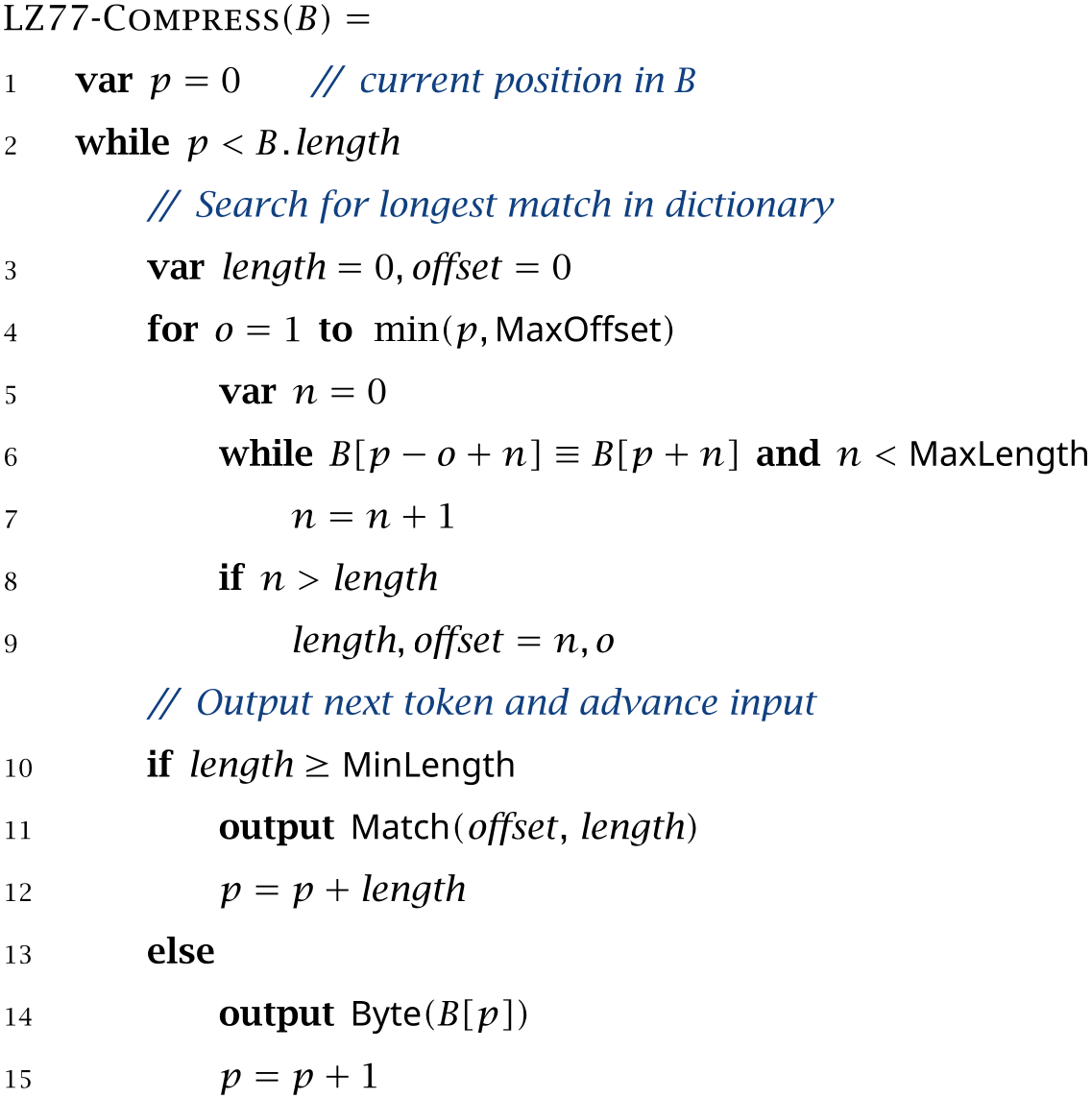
A formal description of the LZ77 compression algorithm is shown in Algorithm 10.1. The input is an array of bytes \(B\) and the output a sequence of Match and Byte tokens that represent the input in compressed form. The algorithm iterates over \(B\) from left to right, using the variable \(p\) to store the current position. In each step, the inner for loop searches for the longest match of the current input in the preceding MaxOffset bytes; the best match found so far is stored in length and offset. The while loop on line 6 compares the byte sequence starting at \(p-o\) to the one at the current position \(p\) and counts the number of matching bytes \(n\). After searching the dictionary, the algorithm outputs a single token that represents one or more bytes starting at \(p\). If the best match is longer than MinLength bytes it outputs a Match token and advances \(p\) by length bytes; otherwise, it outputs a Byte token and advances \(p\) by a single byte.
Algorithm 10.1
Decompression
To recover the original text from the sequence of tokens produced by LZ77, we process each token from left to right and output the byte sequence it describes. For tokens of the form Byte(\(b\)) we output the single byte \(b\), and for tokens of the form Match(offset, length) we copy a sequence of length bytes starting offset places to the left of the current position. During decompression, the dictionary region consists of the last \(D\) bytes that were written to the output. When decoding a token, the dictionary always contains exactly the same bytes as it did when the token was produced, so the decompression algorithm can recover the uncompressed byte sequence exactly.
Let’s decode the tokens that were generated by the compression algorithm in Fig. 10.1; the resulting steps are shown in Fig. 10.2. At the start of the algorithm, both the output and the dictionary are empty. The first seven tokens are Byte tokens, which are decoded by writing their values to the output. One by one, this also populates the dictionary region, which consists of up to six bytes at the end of the output. In Step 7, we have successfully decoded the first seven characters, the last six of which make up the dictionary region.
| Step | Token | Output |
| 1 | Byte(Y) | |
| 2 | Byte(A) | |
| 3 | Byte(A) | |
| 4 | Byte(A) | |
| 5 | Byte(A) | |
| 6 | Byte(␣) | |
| 7 | Byte(D) | |
| 8 | Match(off=6,len=4) | |
| 9 | Match(off=6,len=2) | |
| 10 | Byte(O) | |
| 11 | Match(off=1,len=4) |
The next token, Match(offset=6, length=4), is decoded by copying 4 characters from the dictionary region at offset 6 from the right, which is the string “ABBA” at the beginning of the dictionary. Similarly, the next token Match(offset=6, length=2) duplicates the two bytes “␣D” at offset 6.
The two final tokens produce the string “OOOOO”. The Byte(O) token adds a single “O” to the output, which is then replicated by Match(offset=1, length=4). This Match token is special because the dictionary doesn’t yet contain all four bytes that must be copied. The trick is to interpret Match tokens that extend beyond the end of the dictionary as multiple Match tokens of length 1. In this case, we treat Match(offset=1, length=4) as a sequence of four Match(offset=1, length=1) tokens, each of which duplicates the last “O” in the dictionary. Copying the first “O” produces
The new “O” is now the last byte in the dictionary, so we can copy that too and obtain
The third and fourth “O” are handled the same way. Other Match tokens that extend beyond the current dictionary region are handled similarly; see Exercise 10.1. At this point, no more tokens are left and we have successfully recovered the original byte sequence.
Algorithm 10.2 shows a formal description of the decompression algorithm for LZ77. The variable \(p\) keeps track of the current position in the output. After initializing \(p\) to 0, the algorithm iterates over the tokens and either writes a single byte in the case of a Byte token or a sequence of bytes copied from preceding positions in the output in the case of Match token.
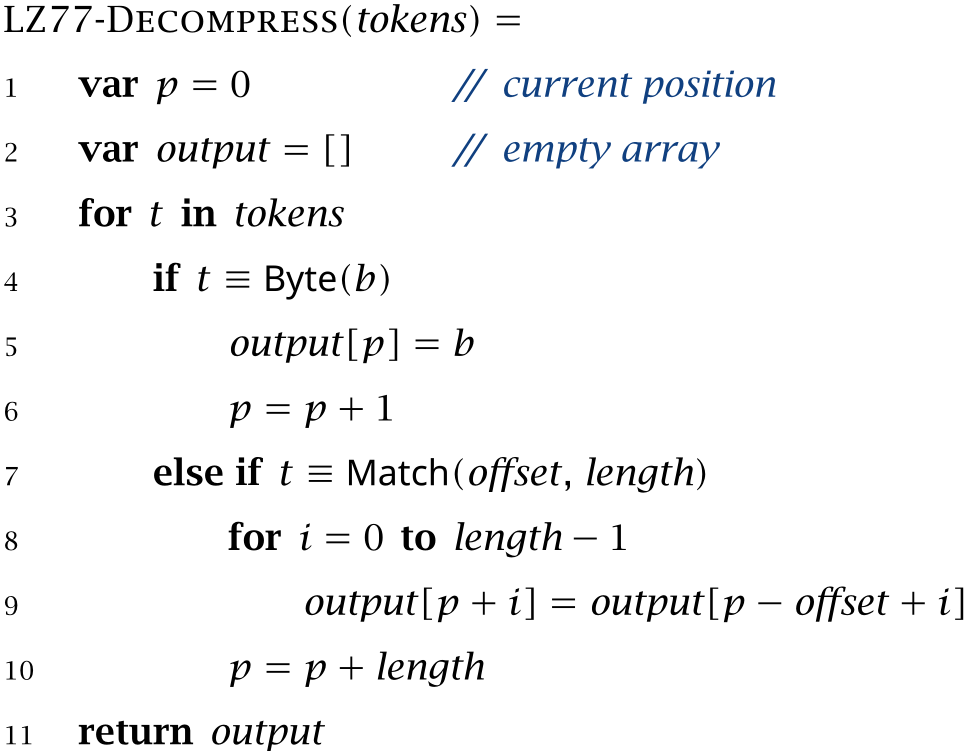
That’s the essence of LZ77 — a simple but surprisingly effective method for detecting and eliminating redundancy in many types of files.
Exercises
[10.1]Consider the LZ77-Decompress algorithm.
-
a) Show that a token of the form Match(offset=\(o\), length=\(n\)) produces the same output as \(n\) tokens of the form Match(offset=\(o\), length=1).
-
b) Describe the output produced for Match(offset=\(o\), length=\(n\)) if \(n>o\), in other words, if the match extends beyond the end of the dictionary region.
[10.2]Use the representation of tokens in Listing 10.1 to implement LZ77-Compress and LZ77-Decompress.
Listing 10.1ch10 / SimpleToken
// Data type for representing LZ77 tokens.
public sealed interface SimpleToken {
    record Byte(byte value) implements SimpleToken {
    }

    record Match(int offset, int length) implements SimpleToken {
    }
}
10.2 From Bytes to Tokens
We will now turn to the problem of implementing the basic algorithms for LZ77 discussed in the previous section. As in our discussion of Huffman coding in the previous chapter, our final goal is to write a small compression program that takes a stream of bytes and outputs a compressed sequence of bits. In the case of LZ77, this problem can be divided into two steps:
-
1. Convert the byte sequence into a sequence of LZ77 tokens. The main challenge in this step is to quickly find potential matches in the dictionary.
-
2. Convert the tokens into an efficient bit sequence. We will discuss two possible encodings for tokens: a simple one called LZSS that maps tokens to bit patterns of fixed length, and a more complex one that adds a second layer of compression by applying Huffman coding to the tokens themselves.
In this section and the next we will discuss the first step, how to convert the input into a sequence of tokens. In Sections 10.4 and 10.5 we will explain methods for encoding tokens.
The first step of LZ77 compression is to analyze the input and turn it into a sequence of Byte andMatch tokens. Algorithm 10.1 made this look easy: iterate over the input, find the longest match in the dictionary using two nested for loops, and output the resulting tokens one by one. Real-world implementations of LZ77 are significantly more complex, however, because they need perform well with large dictionaries and large files.
The performance concerns start with the representation of tokens. In Java, the natural way to represent Byte and Match tokens would be to define two records Byte and Match that implement a common interface SimpleToken:
// Data type for representing LZ77 tokens.
public sealed interface SimpleToken {
    record Byte(byte value) implements SimpleToken {
    }

    record Match(int offset, int length) implements SimpleToken {
    }
}
We used these data types to implement LZ77 in Exercise 10.2.
However, when working with large files and millions of tokens, we can save time and memory by packing both kinds of tokens inside the 64 bits of a single long integer: For Byte tokens, we set the upper 56 bits to zero and store the value in the least significant 8 bits, and for Match tokens, we use the upper 32 bits to store the offset field and the lower 32 bits to store the length field:

We can easily distinguish the two kinds of tokens in this representation: The offset field is a positive integer, so the upper 56 bits are zero for Byte and nonzero for Match tokens.
With this convention, creating Byte tokens and retrieving their values can be accomplished as shown in Listing 10.2. In makeByte() function converts single byte into a token by converting it to long and then clearing the upper 56 bits. The isByteToken() function checks whether a given long represents a Byte token by checking whether the upper 56 bits are all zero. Listing 10.3 defines similar functions for working with Match tokens. The makeMatch() function combines two 32-bit integers into a single long, and getLength() and getOffset() extracts the original values.
Listing 10.2ch10 / LZToken
// Create BYTE token for 'value'.
public static long makeByte(byte value) {
    return (long) value & 0xffL;
}

// Return value of BYTE token as number between 0 and 255.
public static int getByte(long token) {
    return (int) token;
}

// Is token a BYTE?
public static boolean isByteToken(long token) {
    return (token & ~0xffL) == 0;
}
Listing 10.3ch10 / LZToken
// Create MATCH token.
public static long makeMatch(int offset, int length) {
    return ((long) offset << 32) | (long) length;
}

// Retrieve length and offset fields of a MATCH token.
public static int getLength(long token) {
    return (int) token;
}
public static int getOffset(long token) {
    return (int) (token >>> 32);
}
How much memory does this representation save in practice? On a typical 64-bit computer, the Byte and Match records defined in Listing 10.1 consume 16 bytes and 24 bytes of memory, respectively, compared to the 8 bytes per token we achieve by storing them in a long integer; we therefore reduce memory consumption by between 50 % and 67 %.
It turns out that this new representation is also faster because, on most computers, processing arrays of longs is more efficient than processing arrays of SimpleTokens. One reason is that reading data from memory is a relatively slow operation on modern CPUs, so reducing the footprint of a single token is already a win. In addition, processing contiguous blocks of memory (which Java uses for arrays of primitive types such as integer or long) is faster than processing objects that are scattered across the computer’s memory (which often happens to objects like SimpleToken). For more information on the impact of CPUs and their memory architecture on program performance, see the book by Bryant and O’Hallaron [22, Chapter 6].
Cyclic Buffers
We mentioned earlier that all implementations of LZ77 restrict the range of possible Match tokens by placing limits on its offset and length fields:
\(\seteqnumber{0}{10.}{0}\)\begin{align*} 1 &\le \Id {offset} \le \Const {MaxOffset}\\ \Const {MinLength} &\le \Id {length} \le \Const {MaxLength} \end{align*} As a result, only bytes in a small region around the current input position are accessed by the algorithm: The last MaxOffset bytes to the left of the current position serve as the dictionary and the following MaxLength bytes to the right are accessed when searching for the longest match. We therefore only need to keep a small region consisting of \(\textsf {MaxOffset} + \textsf {MaxLength}\) bytes of the input in memory at any time, which is especially important when dealing with large files.
To map the currently visible portion of the file to an array of bytes in memory we use a clever data structure known as a cyclic buffer. A cyclic buffer is an array of size \(N\) that wraps around at both ends: The last element buffer[N-1] is followed by the first element buffer[0] and buffer[0] is preceded by buffer[N-1]. As we iterate over the input, we place the bytes we read into successive entries of the buffer, the first byte into buffer[0], the second into buffer[1], and so on. Every time we reach the end of the buffer we wrap around to its start, so the byte at position \(N\) in the file overwrites the entry in buffer[0], the one at position \(N+1\) the entry in buffer[1], and so on.
Figure 10.3 illustrates how we can use such a cyclic buffer to store the currently visible part of the input when implementing LZ77. We assume that \(\mathsf {MaxOffset}=6\) and \(\mathsf {MaxLength}=4\), so we use a buffer of size 10. The first diagram shows the contents of the buffer after the first six bytes of the input have been processed: The left half of the buffer stores the dictionary region and the right half the part of the input that must be compressed next; the current position is 6. In the second diagram, the input has advanced by one byte, which moves the current position to 7, shifts the dictionary region one place to the right, and stores the next byte read from the input in the buffer’s leftmost entry. The final diagram shows the contents of the buffer after advancing by four more bytes; now the dictionary region wraps around to the start of the buffer.
To map file positions to buffer indexes we use the modulo operator: If \(k\) is the current position in the file, \(k\bmod N\) gives us the index of the current byte, \((k-1)\bmod N\) the index of the previous byte, and so on. Since \(k\) is nonnegative, we can use the remainder operator % to implement this mapping:
buffer[k % buffer.length];
Since computing the remainder is fairly expensive, a common trick is to make the size of the buffer \(N\) a power of 2, which allows us to compute the remainder \(k\bmod N\) by extracting the least significant bits of \(k\) using the expression \(k\AND (N-1)\); an entry in the buffer can then be accessed as follows:
buffer[k & (buffer.length - 1)];
This may look like a mild case of premature optimization, but writing to and reading from the buffer are among the most common operations performed by our implementation of LZ77. Especially when compressing large files, this simple optimization saves millions of remainder operations, which does have a measurable performance impact.
We delegate the details of creating and managing cyclic buffers to a separate class called CyclicBuffer whose only member is an array of bytes buffer (Listing 10.4). The constructor of CyclicBuffer takes the desired size of the buffer as its only argument. To be able to implement the buffer’s wrap-around logic using bit operations, this size is rounded to the next larger power of 2 before allocating the array for buffer. The two methods get() and set() can now perform their index computations using bitwise AND instead of modulo operations.
Listing 10.4ch10 / CyclicBuffer
// A fixed-size cyclic buffer of bytes.
public class CyclicBuffer {
    private final byte[] buffer;

    public CyclicBuffer(int size) {
        // Round the buffer size to next larger power of 2.
        buffer = new byte[1 << IntMath.ceilBinaryLog(size)];
    }

    public byte get(int index) {
        return buffer[index & (buffer.length - 1)];
    }

    public void set(int index, byte v) {
        buffer[index & (buffer.length - 1)] = v;
    }
}
•IntMath: ceilBinaryLog()
For a given number \(n\), the nearest power of 2 that is at least as large as \(n\) is \(2^{\lceil \log _2 n\rceil }\): we first take the binary logarithm of \(n\), round it up to the next larger integer, and then turn the result into a power of 2. We already met the expression \(\lceil \log _2 n\rceil \) in Section 5.3 and also implemented a function ceilBinaryLog() that computes it. Combined with a left shift to compute a power of 2, this gives us the following expression, which is used to initialize the buffer used in CyclicBuffer():
1 << IntMath.ceilBinaryLog(size)
Producing the Next Token
We collect the code for reading the input and generating tokens in a class called LZTokenizer, which is outlined in Listing 10.5. The InputStream being compressed is stored in input, and the parameters of the LZ77 algorithm in maxOffset, maxLength, and minLength. The constructor LZTokenizer() first initializes the four fields defined above and then calls initBuffers() and initIndex() to prepare a few additional data structures.
Listing 10.5ch10 / LZTokenizer
// Converts a stream of bytes into a sequence of LZ77 tokens.
public class LZTokenizer {
    private final InputStream input;
    private final int maxOffset;
    private final int maxLength;
    private final int minLength;

    public LZTokenizer(InputStream input, int maxOffset,
            int maxLength,
            int minLength) throws IOException {
        this.input = input;
        this.maxOffset = maxOffset;
        this.maxLength = maxLength;
        this.minLength = minLength;
        initBuffers();
        initIndex();
    }

    // ...
}
JDK: IOException, InputStream
: initBuffers(), initIndex()
We define a few additional data structures to simplify the task of creating tokens. First, we use one cyclic buffer to store the bytes from the input that are currently visible; this is the “window” through which we view the file, so we call the corresponding field window (Listing 10.6). We manage this buffer using two integers front and lookaheadSize: front is the current position in the file and points to the next uncompressed byte, and lookaheadSize is the number of bytes in the lookahead region. Except at the end of the file, lookaheadSize is always equal to maxLength.
Listing 10.6ch10 / LZTokenizer
private CyclicBuffer window;  // the visible part of the input
private int front;  // the current position
private int lookaheadSize;  // number of bytes after 'front'

public boolean hasRemaining() {
    return lookaheadSize != 0;
}

private void initBuffers() throws IOException {
    this.window = new CyclicBuffer(maxOffset + maxLength);
    this.front = 0;
    this.lookaheadSize = 0;
    while (lookaheadSize < maxLength) {
        int nextByte = input.read();
        if (nextByte == -1)
            break;
        window.set(lookaheadSize++, (byte) nextByte);
    }
}
The input window is initialized in initBuffers(). First, we allocate a cyclic buffer that is large enough to hold the dictionary region and the lookahead region, so its size must be at least maxOffset + maxLength. We then fill the lookahead region with the first maxLength bytes from the file, writing each byte to window and incrementing lookaheadSize afterward.
The main method in class LZTokenizer is nextToken(), which computes and returns the next token (Listing 10.7). The function first searches the dictionary to find the longest match for the byte sequence in the lookahead region. We use a method called findMatches() to compute a list of positions where a match might be found and then compare each of these positions to the bytes at front. The length and offset of the longest match found so far are stored in bestLength and bestOffset. If the best match is sufficiently long, the function returns a Match token and advances the input by bestLength bytes; otherwise, it returns a Byte token and advances by a single byte.
Because we will later want to process tokens in large batches instead of individually, we also provide a method readTokens() that reads as many tokens as possible and stores them in the given array of long integers. The function returns the number of tokens that was read; this is less than size of the array if the end of the input was encountered.
Listing 10.7ch10 / LZTokenizer
// Compute a token for one or more bytes at the current position.
public long nextToken() throws IOException {
    // Find the longest match
    int bestLength = 0, bestOffset = 0;
    for (int matchStart : findMatches()) {
        int n;  // length of current match
        for (n = 0; n < lookaheadSize; n++) {
            if (window.get(front + n) != window.get(
                    matchStart + n))
                break;
        }
        if (n > bestLength) {
            bestLength = n;
            bestOffset = front - matchStart;
        }
    }
    // Return either MATCH or BYTE token
    if (bestLength >= minLength) {
        advanceInput(bestLength);
        return LZToken.makeMatch(bestOffset, bestLength);
    } else {
        advanceInput(1);
        return LZToken.makeByte(window.get(front - 1));
    }
}

// Compute multiple tokens.
// Returns the number of generated tokens.
public int readTokens(long[] tokens) throws IOException {
    int len = 0;
    while (hasRemaining() && len < tokens.length)
        tokens[len++] = nextToken();
    return len;
}
•CyclicBuffer: get()
•LZToken: makeByte(), makeMatch()
•LZTokenizer: advanceInput(), findMatches(), front, hasRemaining(), lookaheadSize, maxLength, minLength, window
10.3 Finding Matches Quickly
The main advantage that LZ77 compression has over Huffman compression is that it is able to compress not just individual bytes but longer sequences of bytes. The downside of this approach is that it is more computationally intensive: Instead of simply translating each byte from the input into a fixed bit sequence, LZ77 has to repeatedly scan the entire dictionary for the longest sequence of bytes that matches the current input. When the dictionary region is small, as in our examples so far, we can scan the dictionary and find the longest match using “brute force,” by iterating over the entire dictionary and comparing each position to the current input.
To achieve good compression rates, however, the dictionary region must usually be significantly larger: Typical values are in the range of 10 000 to 1 000 000 bytes. For dictionaries of this size, finding the longest match using brute force becomes impracticable. Much of the research literature on Lempel-Ziv compression is therefore concerned with different algorithms and data structures for efficiently finding the longest match. The idea behind most of these approaches is to build an auxiliary data structure that lets us quickly find positions in the dictionary that match (or at least resemble) the bytes in the lookahead region. We will call this data structure the index, because it serves a similar purpose as the index in a book.
Indexing the Dictionary Region
The main purpose of the index is to find all positions in the dictionary that match a given string. One of the simplest data structure we can use for this purpose is a table that keeps track of where in the dictionary region each possible character or byte occurs. For example, assume we have advanced to the following position in the input:
The dictionary contains the letter A at positions 1 and 4, the letter B at positions 2 and 3, the space character at position 5, and the letter D at position 6, so our index table would look as follows:
| byte | positions |
| A | 1, 4 |
| B | 2, 3 |
| D | 6 |
| ␣ | 5 |
When searching for the longest match of the current input ABBA, we can use the index to find all occurrences of the first letter A in the dictionary. In this case, A is found in two positions: The byte sequence at position 1 matches all four letters of ABBA, whereas the one at position 4 matches only the first letter. Since the other positions in the dictionary do not even match the first letter, we don’t have to examine them at all.
We can extend this idea to longer matches by maintaining a table that contains the positions of all three-byte sequences in the dictionary:
| bytes | positions |
| ABB | 1 |
| A␣D | 4 |
| BA␣ | 3 |
| BBA | 2 |
| DAB | 6 |
| ␣DA | 5 |
Notice that this table includes the 3-byte sequences starting at positions 5 and 6 even though they extend beyond the end of the dictionary region; this is useful for LZ77, which must be able to find matches that overlap the current input.
The benefit of indexing multiple bytes is that finding long matches becomes much faster. In this particular example, the three-byte sequence “ABB” occurs at only one position, so we find the match for the current input “ABBA” immediately. One limitation of the extended index is that we lose the ability to find matches that are shorter than three bytes; such an index can therefore only be used if we aren’t searching for shorter matches anyway, that is, if the MinLength parameter is at least 3.
What is an appropriate data structure for storing such an index table? For an index that stores the positions of individual bytes, we can get by with a simple nested list:
List<List<Integer>> index;
The outer list consists of 256 entries, one for each possible byte, and the inner lists contains all locations of the corresponding byte. If we want to index the positions of byte sequences instead of individual bytes, such a simple data structure quickly becomes impractical, mainly because the necessary size of the outer list increases rapidly. For example, when indexing three-byte sequences, the required size of index grows to \(256^3=16\,777\,216\) entries. Even worse, many of these entries will be empty since only a small fraction of all possible three-byte sequences is likely to occur in real-world files. To avoid wasting memory, we therefore need to replace the outer array with data structure that doesn’t reserve memory for potentially millions of non-existent index entries.
One way to obtain such a data structure is to employ some form of hashing to redistribute the index entries over a smaller range of values. We can do this by defining a hash function \(h(\cdot )\) that maps each byte sequence to a small numeric value; the number \(h(x)\) is also referred to as the hash code of \(x\). For example, we can define a hash function for 3-byte sequences by simply computing the sum of the three individual bytes:
\(\seteqnumber{0}{10.}{0}\)\begin{equation*} h(b_1b_2b_3) = b_1+b_2+b_3 \end{equation*}
Let’s use this function to compute the hash codes of all 3-byte sequences in the same example as before:
The hash code for the first byte sequence ABB is \(h(\mathtt {ABB}) = 65 + 66 + 66 = 197\). (We use the ASCII table in Fig. 9.2 to translate letters to numeric codes.) The hash code for the second byte sequence BBA is \(66 + 66 + 65 = 197\) as well, and for the remaining positions we obtain the following table:
| position | bytes | hash code |
| 1 | ABB | \(197\) |
| 2 | BBA | \(197\) |
| 3 | BA␣ | \(163\) |
| 4 | A␣D | \(165\) |
| 5 | ␣DA | \(165\) |
| 6 | DAB | \(199\) |
In this case, the six byte sequences map to just four different hash codes; the code \(197\) occurs at positions 1 and 2, the code \(163\) at position \(3\), the code \(165\) at positions 4 and 5, and the code \(199\) at position 6:
| hash code | positions |
| 163 | 3 |
| 165 | 4, 5 |
| 197 | 1, 2 |
| 199 | 6 |
The largest hash code that can occur with this particular hash function is \(256\cdot 3\), so we have managed to reduce the size of the index table from 16 million entries to just 768.
Searching the index works almost the same as before. To find the longest match of the current string ABBA, we compute the hash code of its first three characters, which is \(65+66+66=197\), and then consult the index to find all matching positions in the dictionary, in this case positions 1 and 2. We then then iterate over all matching positions and compare them to ABBA to find the longest match. The byte sequence at position 1 is ABBA and therefore a match of length 4, whereas the one at position 2 is BBA and therefore not a match.
As we just saw, it is possible for distinct byte sequences to have the same hash code, so an index implemented using hashing doesn’t contain guaranteed matches but only potential matches. When two distinct values have the same hash code, we say they collide in the hash table. The likelihood of collisions is determined by the hash function, specifically by the range of values it produces and how well it distributes its arguments over this range. The hash function we used until now — the sum of all bytes — fares relatively poorly in both regards; we will discuss a better alternative shortly.
Implementing the Index
Let’s now turn to the implementation of the ideas we have discussed so far. The index maps integers (hash codes) to lists of integers (positions in the dictionary), so we could define it simply as a nested list of integers, as before
List<List<Integer>> index;
The code in Listing 10.8 uses a slightly different definition for index that replaces the inner List with a double-ended queue of type Deque. As we will explain in more detail below, this allows us to add new entries at one end of the queue and remove outdated entries from the other. The initIndex() method in the same listing initializes index by allocating an array of size INDEX_SIZE and populating each entry with an empty queue.
Listing 10.8ch10 / LZTokenizer
private final int INDEX_SIZE = 8191;
private List<Deque<Integer>> index;

private void initIndex() {
    index = new ArrayList<>(INDEX_SIZE);
    for (int i = 0; i < INDEX_SIZE; i++)
        index.add(new ArrayDeque<>());
}
JDK: ArrayDeque, ArrayList, Deque, List
•LZTokenizer
Next, we need to define a hash function that maps sequences of bytes to entries in index. Instead of simply computing the sum of all bytes, as we did previously, we use a function that spreads the resulting hash codes more evenly and over a larger range. More specifically, we compute the hash code of a byte sequence \(b_0,\ldots ,b_k\) by combining their numerical values as follows:1
\(\seteqnumber{0}{10.}{0}\)\begin{equation*} h(b_0,\ldots ,b_k)= b_0 31^k + b_1 31^{k-1} +\cdots + b_{k-1} 31 + b_k = \sum _{i=0}^k b_i 31^{k-i} \end{equation*}
We can obtain an equivalent expression that can be evaluated more efficiently by repeatedly factoring out the multiplier \(31\):
\(\seteqnumber{0}{10.}{0}\)\begin{equation*} h(b_0,\ldots ,b_k)=(\cdots (b_0\cdot 31+b_1)\cdot 31+\cdots )\cdot 31 + b_k \end{equation*}
This factorization is known as Horner’s scheme and is widely used when computing sums of powers; we will meet it again in a different context in the Chapter 11.
The implementation of this hash function is straightforward. In our case, the hash code must only be computed for the byte sequence at the front of window. By default, the hashFront() method in Listing 10.9 computes the hash code of the next minLength bytes in the lookahead region, but fewer bytes are used near the end of the input. The return statement in the last line reduces the computed hash code to a number between 0 and INDEX_SIZE-1. The floorMod() method is used instead of the % operator to ensure that the result is always a nonnegative integer.
Listing 10.9ch10 / LZTokenizer
// Compute the hash code of the bytes at positions
// front, front+1, ...
private int hashFront() {
    int length = Math.min(minLength, lookaheadSize);
    int hash = 0;
    for (int i = 0; i < length; i++) {
        hash = hash * 31 + window.get(front + i);
    }
    return Math.floorMod(hash, INDEX_SIZE);
}
JDK: Math
•CyclicBuffer: get()
•LZTokenizer: front, INDEX_SIZE, lookaheadSize, minLength, window
The index must be updated every time the input is advanced and new characters enter the dictionary region. The advanceInput() method shown in Listing 10.10 advances the input by numBytes characters and uses a for-loop to update both index and window for each character read. First, we use hashFront() to retrieve the index entry for the byte sequence at the front of the lookahead region; this is the byte sequence that is about to enter the dictionary. We then associate the current position with this hash code by adding front to positions. Since we add new positions using addFirst(), the positions in each index entry are in reverse order: The first element is the latest matching position in the file and the last element the earliest. Afterward, advanceInput() reads the next character from the input, writes it to window, and increments front to shift the window one place to the right. Once we have reached the end of the input, we gradually decrease lookaheadSize.
Listing 10.10ch10 / LZTokenizer
// Advance the input and update 'window' and 'index'.
private void advanceInput(int numBytes) throws IOException {
    assert lookaheadSize >= numBytes;
    for (int i = 0; i < numBytes; i++) {
        Deque<Integer> positions = index.get(hashFront());
        positions.addFirst(front);
        int nextByte = input.read();
        if (nextByte != -1)
            window.set(front + lookaheadSize, (byte) nextByte);
        else
            lookaheadSize--;
        front++;
    }
}
JDK: Deque, InputStream
•CyclicBuffer: set()
•LZTokenizer: front, hashFront(), index, lookaheadSize, window
Next, we need a method that queries the index to find all positions in the dictionary that potentially match the byte sequence at the front of the lookahead region. The simplest possible implementation of this operation simply returns the index entry for hashFront():
return index.get(hashFront())
The findMatches() method in Listing 10.11 additionally performs a bit of maintenance work and first removes all positions from the entry that are no longer inside the dictionary region. Since the positions in each queue are stored in decreasing order, we can simply drop all positions from the end of the queue that are smaller than dictStart, the current start of the dictionary.
Listing 10.11ch10 / LZTokenizer
// Find the positions of potential matches in the dictionary.
private Iterable<Integer> findMatches() {
    Deque<Integer> positions = index.get(hashFront());
    int dictStart = front - maxOffset;
    while (!positions.isEmpty()
            && positions.getLast() < dictStart)
        positions.removeLast();
    return positions;
}
1 This hash function is also widely used in the Java standard library, among other things to compute the hash code of Strings and ArrayLists.
10.4 The LZSS Encoding
To finish the implementation of LZ77, we have to convert the list of LZ77 tokens into a sequence of bits. We start with a simple encoding known as LZSS in this section and discuss a more advanced encoding that uses Huffman coding to compress the tokens themselves in Section 10.5.
The LZSS encoding converts each LZ77 token into a bit sequence that consists of two parts:
The first bit identifies the token’s type (0 for Byte and 1 for Match tokens) and the remaining bits describe the tokens contents. For Byte tokens we encode the uncompressed byte in a block of eight bits, and for Match tokens we encode the token’s offset and length fields in a fixed number of bits each. The example shown above uses 14 bits for the offset field and 8 bits for the length field.
In the worst case, every byte of the input must be encoded as a Byte token because no suitable match could be found in the dictionary region. Since LZSS encodes every Byte token as a 9-bit sequence, the output ends up being 12.5 % larger than the input — in this case, the algorithm doesn’t compress the data but expands it! This worst case isn’t as rare as it may seem. Many types of files, including digital photographs, audio files, and files that have already been compressed, contain little redundancy that can be exploited by LZ77. To handle this kind data more gracefully, most compression programs have the ability to store blocks of incompressible data in its original form.
Conversely, the best case for LZSS occurs when almost all tokens are Match tokens. (We always require a few Byte tokens at the beginning of the file to populate the dictionary.) The compression rate in this case depends on the number of bits we use to encode the offset and length fields. In many types of files — including English text or source code — it’s mostly individual words or short phrases that are repeated frequently, whereas longer character sequences or entire sentences tend to occur only once. As a result, we generally achieve better compression rates if we allocate more bits to the offset field than to the length field.
Let’s define a few constants before we embark on the actual implementation of LZSS; since these constants are used by both the encoder and the decoder, we collect them in a separate class LZSS shown in Listing 10.12. OFFSET_BITS and LENGTH_BITS are the number of bits that are used to encode the offset and length fields, respectively. We use 14 bits for the offset field and only 4 bits for the length field, which is a trade-off that works well in practice. With this choice, a single Match tag is encoded using 19 bits and a single Byte tag using 9 bits. It is therefore slightly more efficient to encode a match of length 2 as a sequence of two Byte tokens. We require that all matches are at least three bytes long by setting the MIN_LENGTH field to 3. The two constants BYTE_TAG and MATCH_TAG contain the value of bit at the beginning of each encoded token.
Listing 10.12ch10 / LZSS
// Constants used by the LZSS implementation.
public class LZSS {
    public static final int OFFSET_BITS = 14;
    public static final int LENGTH_BITS = 4;
    public static final int MIN_LENGTH = 3;

    public static final int BYTE_TAG = 0;
    public static final int MATCH_TAG = 1;

    public static final int MAX_OFFSET = (1 << OFFSET_BITS) - 1;
    public static final int MAX_LENGTH =
            (1 << LENGTH_BITS) + MIN_LENGTH - 1;
}
The last two constants in Listing 10.12 are MAX_LENGTH and MAX_OFFSET, which specify the largest values of the length and offset fields that can be encoded in a Match token. The largest offset value is simply the largest integer that can be encoded using OFFSET_BITS bits, which is
\(\seteqnumber{0}{10.}{0}\)\begin{equation*} \mathtt {MAX\_OFFSET}=2^{\mathtt {OFFSET\_BITS}}-1. \end{equation*}
We use a slightly different expression for MAX_LENGTH. Since length values below MIN_LENGTH are unused, we can subtract MIN_LENGTH from every length value before encoding it and thereby represent values of up to
\(\seteqnumber{0}{10.}{0}\)\begin{equation*} \mathtt {MAX\_LENGTH} = 2^{\mathtt {LENGTH\_BITS}}-1 + \mathtt {MIN\_LENGTH}. \end{equation*}
Listing 10.13 shows the complete compression algorithm with LZSS encoding. The compress() method first uses the constants we just defined to create a suitable instance of LZTokenizer and then converts each token to a sequence of bits. For each Byte token we write a BYTE_TAG followed by eight bits, and for each Match token we write a MATCH_TAG followed by the offset and length fields. The value of the length field is reduced by MIN_LENGTH before encoding it. The compressed data is always terminated with a Match token whose offset and the length are both zero. This token can never occur as part of the compressed data since offset is always positive; we use it to terminate the bit stream and let the decoder know that no more data follows.
Listing 10.13ch10 / LZSSEncoder
public static void compress(InputStream in, BitOutputStream out)
        throws IOException {
    var lz = new LZTokenizer(in, LZSS.MAX_OFFSET, LZSS.MAX_LENGTH,
            LZSS.MIN_LENGTH);
    while (lz.hasRemaining()) {
        long token = lz.nextToken();
        if (LZToken.isByteToken(token)) {
            out.writeBit(LZSS.BYTE_TAG);
            out.writeBits(LZToken.getByte(token), 8);
        } else {
            out.writeBit(LZSS.MATCH_TAG);
            out.writeBits(LZToken.getOffset(token), LZSS.OFFSET_BITS);
            out.writeBits(LZToken.getLength(token) - LZSS.MIN_LENGTH,
                    LZSS.LENGTH_BITS);
        }
    }
    out.writeBit(LZSS.MATCH_TAG);
    out.writeBits(0, LZSS.OFFSET_BITS);
    out.writeBits(0, LZSS.LENGTH_BITS);
    out.flush();
}
JDK: InputStream
•BitOutputStream: writeBit(), writeBits()
•LZSS
•LZToken: getByte(), getLength(), getOffset(), isByteToken()
•LZTokenizer: hasRemaining(), LZTokenizer(), nextToken()
The decompression algorithm for LZSS mirrors the operation of the compression algorithm. The decompress() method in Listing 10.14 takes a bit stream produced by compress() as its input and outputs the original, uncompressed sequence of bytes. The function starts by defining two variables: a circular buffer dict that we use to store the contents of the dictionary region, and an integer pos that holds the current position in the decompressed file. The while loop then reads tokens until it encounters the end marker Match(offset=0, length=0). The two types of tokens are distinguished by reading a single bit. If the next token is of type Byte, we copy one byte from the bit stream to the output and also append it to dict. If the next token is of type Match, we first read the fixed-length offset and length fields from the stream. If both fields are zero, the end of the compressed data has been reached and decompress() stops immediately. Otherwise, we copy the specified number of bytes from dict to the output and append it to dict.
Listing 10.14ch10 / LZSSDecoder
public static void decompress(BitInputStream in, OutputStream out)
        throws IOException {
    var dict = new CyclicBuffer(LZSS.MAX_OFFSET);
    int pos = 0;  // position in uncompressed data
    while (true) {
        if (in.readBit() == LZSS.BYTE_TAG) {
            byte b = (byte) in.readBits(8);
            out.write(b);
            dict.set(pos, b);
            pos++;
        } else {
            int offset = (int) in.readBits(LZSS.OFFSET_BITS);
            int length = (int) in.readBits(LZSS.LENGTH_BITS);
            if (offset == 0 && length == 0)
                break;  // end of compressed data reached
            for (int i = 0; i < length + LZSS.MIN_LENGTH; i++) {
                byte b = dict.get(pos - offset);
                out.write(b);
                dict.set(pos, b);
                pos++;
            }
        }
    }
}
JDK: OutputStream
•BitInputStream: readBit(), readBits()
•LZSS
10.5 Compressing LZ77 Tokens
The LZSS encoding we discussed in the previous section encodes each Byte and Match token using a fixed number of bits. In practice, however, some tokens occur much more frequently than others. Wouldn’t it therefore be preferable to encode common tokens using fewer bits than rare tokens? The answer is yes, but designing such an encoding poses a few interesting and unexpected challenges.
A straightforward solution would be to count how often each token occurs and then use Huffman’s algorithm to design an optimal bit encoding. At first sight, this works well. For example, if we split the full text of Alice in Wonderland into tokens and construct the corresponding Huffman code, we can encode each token using an average of 13.3 bits, whereas LZSS requires 17.2 bits on average. There is a catch, however: The 13.3 bits for Huffman coding do not include the size of the Huffman tree, which must be transmitted along with the compressed data. Unfortunately, this tree is massive since there are more than 20 000 different tokens. If we include the size of the encoded tree in the calculation, the storage requirements more than doubles to 27.3 bits per token, which is almost 60 % more than the simple LZSS encoding.
It’s easy to see why Huffman coding doesn’t work well in this case by considering the frequency distribution of tokens shown in Table 10.1. There are 74 unique Byte tokens, the majority of which (61 or 82 %) occurs at least ten times; this is the kind of distribution for which Huffman coding works well. In contrast, most of the 20 027 Match tokens occur just once, so the gains made by Huffman coding are more than offset by the need to include a Huffman tree with more than 20 000 nodes in the output. There is simply too little redundancy in the Match tokens to justify the overhead of Huffman coding.
But there are still ways to improve on the fixed-length encoding used by LZSS. As a first step, let’s take a closer look at the Match tokens that occur when compressing Alice in Wonderland. Figure 10.4 shows a histogram of all the offset values. It’s obvious that small offset values occur much more frequently than large values, which means that in most cases the best match is found in the preceding few thousand bytes. The histogram of the length values looks similar, which means that most matches are close by and fairly short. We therefore need a way to encode integers like offset and length so that small values take up fewer bits in the output than large values.
Variable-Length Codes for Integers
There are many ways to encode integers using a variable number of bits. We already encountered two examples in the previous chapter: The unary code discussed in Exercise 9.6 encodes a positive integer \(n\) as a sequence of \(n\) ones followed by a single zero, and the UTF-8 encoding discussed in Exercise 9.14 stores numbers between 0 and 0x10FFFF using one to four bytes. Another class of such variable-length integers can be obtained by encoding an integer’s binary representation and the length of this representation separately.
Let’s start with a simple example of such an encoding. Given a nonnegative integer \(n\), we first encode its bit length \(\bitlen (n)\) using a fixed number of bits \(L\) and then append the \(\bitlen (n)-1\) least significant bits of the binary representation of \(n\) itself. (For \(n=0\) and \(n=1\), we append no additional bits.) Table 10.2 demonstrates this encoding for a few small values of \(n\), in this case using \(L=5\) bits to encode \(\bitlen (n)\). The first two columns show the number being encoded in decimal and binary form, the next two columns its bit length, and the final column the resulting bit sequence, which is obtained by extending \(\bitlen (n)\) to 5 bits and then appending the lowest \(\bitlen (n)-1\) bits of \(n\).
| \(n\) | \(\bitlen (n)\) | Codeword | ||
| \(0\) | \(0_2\) | \(0\) | \(0_2\) | 00000 |
| \(1\) | \(1_2\) | \(1\) | \(1_2\) | 00001 |
| \(2\) | \(10_2\) | \(2\) | \(10_2\) | 00010 0 |
| \(3\) | \(11_2\) | \(2\) | \(10_2\) | 00010 1 |
| \(4\) | \(100_2\) | \(3\) | \(11_2\) | 00011 00 |
| \(5\) | \(101_2\) | \(3\) | \(11_2\) | 00011 01 |
| \(6\) | \(110_2\) | \(3\) | \(11_2\) | 00011 10 |
| \(7\) | \(111_2\) | \(3\) | \(11_2\) | 00011 11 |
| \(8\) | \(1000_2\) | \(4\) | \(100_2\) | 00100 000 |
| \(\vdots \) | \(\vdots \) | \(\vdots \) | \(\vdots \) | \(\vdots \) |
| \(3410\) | \(110101010010_2\) | 12 | \(1100_2\) | 01100 10101010010 |
| \(\vdots \) | \(\vdots \) | \(\vdots \) | \(\vdots \) | \(\vdots \) |
The range of numbers that can be encoded using this format depends on the number \(L\) of bits used to encode \(\bitlen (n)\). The largest positive number that can be encoded is
\[ n_{\max } = 2^{2^{L}-1}-1. \]
Conversely, if \(n_{\max }\) is the largest number of interest, we need at least
\[ L=\bitlen \bigl (\bitlen (n_{\max })\bigr ) \]
bits to encode the bit length of \(n_{\max }\). For \(L=5\) the largest value that can be encoded is \(n_{\max }=2^{31}-1\), which is also the largest number that can be stored in a signed 32-bit integer.
The following method demonstrates how to encode an integer n in this format. The resulting bit sequence is written to out and the parameter lengthBits indicates the number of bits that are used for \(\bitlen (n)\).
public static void writeInteger(
        int n, int lengthBits, BitOutputStream out)
        throws IOException {
    int length = IntUtil.bitLength(n);
    out.writeBits(length, lengthBits);
    if (length > 1)
        out.writeBits(n, length - 1);
}
•BitOutputStream: writeBits()
•IntUtil: bitLength()
Decoding an integer stored in this format is just as easy. We first read \(L\) bits to recover \(\bitlen (n)\). If \(\bitlen (n)\le 1\), we are done and return \(\bitlen (n)=n\). Otherwise, we read \(\bitlen (n)-1\) additional bits for the least significant bits of \(n\) and finish by adding the missing most significant bit:
static int readInteger(BitInputStream in, int lengthBits)
        throws IOException {
    int length = (int) in.readBits(lengthBits);
    if (length <= 1)
        return length;
    return (1 << length - 1) | (int) in.readBits(length - 1);
}
The main limitation of the code we just described is that it cannot encode integers using fewer than \(L\) bits, which can be a problem if small numbers are overwhelmingly common. We can easily remedy this problem by choosing a different code for \(\bitlen (n)\). For instance, given an arbitrary prefix code bitlenCode, we can generalize the implementation of writeInteger() as follows:
static void writeInteger(
        int n, PrefixCode bitlenCode, BitOutputStream out) {
    int length = IntUtil.bitLength(n);
    bitlenCode.writeSymbol(length, out);
    if (length > 1)
        out.writeBits(n, length - 1);
}
•BitOutputStream: writeBits()
•IntUtil: bitLength()
•PrefixCode: writeSymbol()
To read an integer stored in this format, we first use bitlenCode to decode the bit length and then read the remaining bits as before.
The LZH Encoding
We can now turn to the problem of designing a more efficient encoding for LZ77 tokens. Here is our general plan of attack:
-
• For Byte tokens, we will use a Huffman code because typically some bytes occur much more frequently than others.
-
• For Match tokens, we will encode the offset and length fields as variable-length integers, similar to the ones we just described. We will use Huffman codes to encode the bit lengths of the two fields.
The use of Huffman coding requires that the compression algorithm processes the input in two passes: The first pass converts the input into LZ77 tokens and constructs the necessary Huffman codes, and the second pass converts the tokens into bit sequences and writes them to the output.
The simplest implementation of the plan outlined above requires three Huffman codes: one for the Byte tokens and one each for the \(\bitlen (\Id {offset})\) and \(\bitlen (\Id {length})\) fields of Match tokens. In practice, it is more efficient to use one combined Huffman code for Byte tokens and length fields and a separate Huffman code for the offset fields. Listing 10.15 shows the outline of LZHEncoder, the class that will house the resulting compression algorithm. We will call the resulting format LZH because it is a combination of Lempel-Ziv compression and Huffman coding. The two Huffman codes we will use are stored in offsetCode and tagCode. As before, maxOffset, maxLength, and minLength are three parameters that control the conversion of the input into tokens. Because values of length below minLength are never used, we will instead encode the reduced length
\[ \Id {length}' = \Id {length} - \mathtt {minLength}. \]
Listing 10.15ch10 / LZHEncoder
// A class for compressing data using LZ77 and Huffman coding.
public class LZHEncoder {
    // Prefix codes for encoding tokens.
    PrefixCode offsetCode;
    PrefixCode tagCode;

    // Parameters for LZ77.
    final int maxOffset;
    final int minLength;
    final int maxLength;

    // ...
}
The first code offsetCode is the simpler of the two and encodes the bit lengths of the offset fields in Match tokens. In contrast, the second code tagCode is more complicated because it can encode three different kinds of information, depending on the context:
-
• The first 256 symbols represent all possible Byte tokens.
-
• The next symbol with value 256 is a special tag that marks the end of the compressed data.
-
• The remaining tags starting at 257 represent Match tokens and store the bit length of \(\Id {length}'\),
The meaning of all possible tags is summarized in Fig. 10.5.
| Tag | Symbol | ||
| Byte(0) | 0 |
| } Byte tokens |
| Byte(1) | 1 | ||
| … | … | ||
| Byte(255) | 255 | ||
| end of file | 256 | ||
| \(\bitlen (\Id {length}') = 0\) | 257 |
| } Match tokens |
| \(\bitlen (\Id {length}') = 1\) | 258 | ||
| … | … |
Listing 10.16 demonstrates how to construct tagCode and offsetCode. We first prepare two frequency tables, tagCount and offsetCount, which are used to tally the frequency of the different tags and \(\bitlen (\Id {offset})\) values, respectively. For each Byte token in the input, we increment the corresponding entry in tagCount, and for each Match token, we increment the entry for \(\bitlen (\Id {length}')\) in tagCount and the one for \(\bitlen (\Id {offset})\) in offsetCount. Once this is done, we use the resulting frequency tables to construct the corresponding Huffman codes.
Listing 10.16ch10 / LZHEncoder
// Analyze LZ77 tokens and prepare Huffman codes.
void prepareCodes(long[] tokens, int numTokens) {
    int[] tagCount =
            new int[257 + bitLength(maxLength - minLength) + 1];
    int[] offsetCount = new int[bitLength(maxOffset) + 1];
    tagCount[256] = 1;  // end of file occurs exactly once
    for (int i = 0; i < numTokens; i++) {
        long token = tokens[i];
        if (LZToken.isByteToken(token)) {
            tagCount[LZToken.getByte(token)] += 1;
        } else {
            int length = LZToken.getLength(token) - minLength;
            int offset = LZToken.getOffset(token);
            tagCount[257 + bitLength(length)] += 1;
            offsetCount[bitLength(offset)] += 1;
        }
    }
    tagCode = HuffmanCode.construct(tagCount);
    offsetCode = HuffmanCode.construct(offsetCount);
}
•HuffmanCode: construct()
•IntUtil: bitLength()
•LZHEncoder: maxLength, minLength, offsetCode, tagCode
•LZToken: getByte(), getLength(), getOffset(), isByteToken()
Using these two Huffman codes we can now encode a single LZ77 token as follows. If the token is a Byte token, we use tagCode to output the symbol with same numeric value. If the token is a Match token, we output four pieces of data, as shown in Listing 10.17:
-
1. The value \(257+\bitlen (\Id {length}')\), encoded using tagCode.
-
2. The \(\bitlen (\Id {length}')-1\) least significant bits of \(\Id {length}'\).
-
3. The value \(\bitlen (\Id {offset})\), encoded using offsetCode.
-
4. The \(\bitlen (\Id {offset})-1\) least significant bits of offset.
As you can see, values encoded using tagCode have two functions: They announce the type of token that follows in the bit stream and, for added efficiency, include some information about that token as well.
Listing 10.17ch10 / LZHEncoder
// Encode a single token and write the resulting bits to output.
private void writeToken(BitOutputStream output, long token)
        throws IOException {
    if (LZToken.isByteToken(token)) {
        tagCode.writeSymbol(LZToken.getByte(token), output);
    } else {
        int length = LZToken.getLength(token) - minLength;
        int offset = LZToken.getOffset(token);
        tagCode.writeSymbol(257 + bitLength(length), output);
        if (length > 1)
            output.writeBits(length, bitLength(length) - 1);
        offsetCode.writeSymbol(bitLength(offset), output);
        if (offset > 1)
            output.writeBits(offset, bitLength(offset) - 1);
    }
}
•IntUtil: bitLength()
•LZHEncoder
•LZToken: getByte(), getLength(), getOffset(), isByteToken()
•PrefixCode: writeSymbol()
The general process for compressing a file using LZH is similar to the one for LZSS compression: We convert the file into a list of tokens and then encode each token as a sequence of bit. The main difference is that LZH compression requires an additional pass over the list of tokens to analyze their distribution and construct the necessary Huffman codes. This poses a new problem: When compressing large files, it may not be possible to store all tokens in memory, and scanning the entire input twice is costly and not always possible. Most compression programs therefore split large files into smaller blocks that fit into memory and can then be compressed independently.
The compress() method in Listing 10.18 compresses a given input by splitting it into blocks of a \(2^{20}\) tokens. For each block, we initialize tagCode and offsetCode by calling prepareCodes(). We then write the codes themselves to the output, and finally encode each token using writeToken(). After the last block has been processed, we end the output stream with a single end of file tag.
Listing 10.18ch10 / LZHEncoder
public void compress(InputStream input, BitOutputStream output)
        throws IOException {
    final int blockSize = 1024 * 1024;
    var tokens = new long[blockSize];
    var lz = new LZTokenizer(input, maxOffset, maxLength, minLength);
    output.writeBits(maxOffset, 32);
    output.writeBits(blockSize, 32);
    while (lz.hasRemaining()) {
        int numTokens = lz.readTokens(tokens);
        prepareCodes(tokens, numTokens);
        tagCode.writeCode(output);
        offsetCode.writeCode(output);
        for (int i = 0; i < numTokens; i++)
            writeToken(output, tokens[i]);
    }
    tagCode.writeSymbol(256, output);  // end marker
    output.flush();
}
The final member of LZHEncoder we need to implement is the constructor, which initializes the parameters maxOffset, minLength, and maxLength. We again prevent short matches by setting minLength to 3, but the improved encoding of Match tokens gives us considerably more latitude when it comes to setting the other two parameters. For instance, we can afford to increase maxLength to 1024, which is a more than a hundred times larger than the value we used for LZSS.
The most important parameter is maxOffset, because it determines the size of the dictionary region. Instead of using a fixed value, we let users of LZHEncoder control maxOffset indirectly by specifying the desired compression quality as a non-negative integer quality. We set
\[ \mathtt {maxOffset} = 2^{10 + \Id {quality}}, \]
so the dictionary doubles in size every time we increment quality. At the lowest quality 0, the dictionary is just 1024 bytes in size, and the largest quality we accept is 15, which corresponds to a dictionary of 32 megabytes (Listing 10.19).
Listing 10.19ch10 / LZHEncoder
public LZHEncoder(int quality) {
    if (quality < 0 || quality > 15)
        throw new IllegalArgumentException();
    maxOffset = (1 << (10 + quality)) - 1;
    minLength = 3;
    maxLength = 1024;
}
In practice, each increment of quality reduces the size of the compressed output by a few percentage points. At the same time, however, each increment also increases the running time by approximately 30 % to 100 %, mainly because a larger dictionary must be searched.
The decompression algorithm for LZH is discussed in Exercise 10.5.
Exercises
[10.3]Construct a Huffman code for the LZ77 tokens in the following table:
| Token | Frequency | |
| Byte(Y) | 1 | |
| Byte(A) | 2 | |
| Byte(B) | 2 | |
| Byte(␣) | 1 | |
| Byte(D) | 1 | |
| Match(offset=6, length=4) | 1 | |
| Match(offset=6, length=2) | 1 | |
| Byte(O) | 1 | |
| Match(offset=1, length=4) | 1 |
[10.4]The Elias gamma code is a variable-length code for integers that is similar to the codes discussed in this section. For a given number \(n\), it encodes the number’s bit length and the actual bits as follows:
-
1. Write a sequence of \(\bitlen (n)-1\) zero-bits followed by a single one-bit.2
-
2. Append the \(\bitlen (n)-1\) least significant bits of \(n\).
Use this code to encode the numbers in Table 10.2.
[10.5]Complete the implementation of LZH compression in this section by writing a program that takes the output of LZHEncoder and decodes it, recovering the original uncompressed file.
2 This is a so-called unary code, which we already discussed in Exercise 9.6.
10.6 Comparison of Algorithms
In this chapter and the last we have developed three different compression algorithms: Huffman coding and LZ77 compression with two different encodings, namely LZSS and LZH. The chart in Fig. 10.6 compares the effectiveness of the three algorithms when compressing four typical files. For LZH compression we show two results, one for quality level 4 (LZH4) and one for quality level 9 (LZH9). In addition, we include the compression rates achieved by two state-of-the-art compression programs, bzip2 and xz.
Overall, Huffman compression is the worst performer in the group and is hampered by its inability to remove redundancy at the level of multiple bytes. LZSS compression performs significantly better on text-based files since it is able to encode repeated words and phrases. The improved encoding of tokens with LZH yields even better result and outperforms both LZSS and Huffman coding in all examples. The algorithms used by bzip2 and xz produce the best results and outperform our compression methods, sometimes by a significant margin.
For LZH, increasing the quality level typically improves the compression rate as well since repetitions can be found over longer distances. An interesting counter-example is the SVG image in part (c) of the figure, where the smaller window actually produces slightly better results. How can this be? With LZH, the number of bits required to encode a token isn’t fixed but depends on the distribution of tokens for the particular file being compressed. As a result, shorter matches can sometimes produce better results than a long matches simply because the overall distribution of tokens is more favorable. A better strategy than searching for the longest matches is to search for matches that can be encoded most efficiently; some modern compression algorithms implement this idea.
The only file that is difficult to compress is the TIFF image in part (d) of the figure: Most compression algorithms are merely able to reduce its size by a few percent. With LZSS compression, the file size even increases by more than 10 %, which is close to the worst-case mentioned in Section 10.4: Most of the file is encoded using Byte tokens, which take up 12.5 % more space than the original bytes.
10.7 Problems
LZ4 Compression
[10.6]There are countless variations of Lempel-Ziv compression, many of which are optimized for particular applications. One of them is LZ4, a compression algorithm that is primarily designed for fast decompression. In the following, we will discuss a slightly simplified version of LZ4.3
Similar to other Lempel-Ziv-based algorithms, LZ4 compresses the input by finding matching byte sequences to the left of the current position. The main difference is that the compressed format of LZ4 is designed with high decompression speed in mind: The decompression process can be reduced to the problem of copying contiguous blocks of memory from one location in memory to another.
On a more technical level, LZ4 divides the uncompressed input into sequences. Each sequence consists of two parts: a string of literal bytes that is stored without compression and a string of bytes that is copied from earlier in the file. As before, we refer to strings that can be copied as matches and represent them by an offset from the current position and a length; matches are always at least 4 bytes long. For instance, the string “YABBA DABBA DOOOOO” can be encoded using two sequences:
-
LZ4(“YABBA␣D”, offset=6, length=6)
LZ4(“O”, offset=1, length=4)
The match part of the first sequence duplicates the six-character sequence “ABBA␣D” and that of the second sequence creates the four trailing “O”s. As with LZ77, if the length of a match is larger than the offset (that is, if the match extends beyond the current position) it represents a run of repeated characters (see also Exercise 10.1).
-
a) Split the following input into sequences. Assume that every line ends with a single newline character 0xA.
Around the world, around the world
Around the world, around the world
Around the world, around the world
Around the world, around the world
The output format of LZ4 differs from encodings such as LZSS in that is byte-based, so the decoder doesn’t have to deal with bit streams and the overhead they incur. Most importantly, the literal part of every sequence is stored in the compressed file as a contiguous array of bytes. Therefore, a single sequence can be decompressed by performing two memory copies: One for the literal part of the sequence, which copies bytes from the compressed data to the output, and one for the match part, which duplicates bytes that were decompressed earlier. LZ4 gains much of its speed from the fact that copying blocks of bytes is extremely fast, especially when the blocks are large.
LZ4 places no arbitrary limits on the length of the literal or the match part of a sequence and encodes both values as variable-length integers. Let’s take a look at the general format of a single sequence:

Here is the detailed description of these five fields:
- header
-
Every sequence starts with a 1-byte header, which consists of two 4-bit fields. The upper 4 bits hold the length of the literal llength and the lower 4 bits the length of the match \(\Id {mlength}\).
- llength+
-
If the value of llength in the header is 15, this field encodes the remainder of the literal length. To recover the full value of llength, repeatedly read an unsigned byte \(b\), add it to llength, and continue until \(b < 255\).
- literal
-
This sequence of bytes represents the literal part of the sequence. Consists of llength bytes.
- moffset
-
The match offset as a 16-bit unsigned integer in little-endian order (first the lower 8 bits of the offset, then the upper 8 bits). The last sequence of a file may omit the match part, which is indicated by setting moffset to 0.
- mlength+
-
If the mlength field in the header is 15, these bytes encode the remainder of the match length, using the same format as llength.
As noted above, all matches have a length of at least 4 bytes. To save a little space, the mlength field therefore doesn’t store the actual length but the length reduced by 4: \(\Id {mlength}=0\) represents a match of 4 bytes, \(\Id {mlength}=1\) a match of 5 bytes, and so on.
-
b) Find the byte encoding of the following two sequences:
-
LZ4(“YABBA␣D”, offset=6, length=6)
LZ4(“O”, offset=1, length=40)
-
-
c) How does LZ4 perform if the input is incompressible, i.e., if no matches can be found? Estimate by what percentage the file size increases if the length of input is \(n\) bytes, assuming that \(n\) is fairly large.
Compression and decompression programs for LZ4 can be implemented using the same techniques we used for LZ77. The main difference is that LZ4 is designed for operating on arrays of bytes, so we don’t use streams but byte arrays for representing the input and output. We use the outline of the class LZ4Decoder shown in Listing 10.20 as the starting point for writing an LZ4 decoder.
Listing 10.20ch10 / LZ4Decoder
public class LZ4Decoder {
    private byte[] in;       // compressed input
    private int inLength;    // length of 'input'
    private byte[] out;      // uncompressed output
    private int inPos = 0;   // current position in 'in'
    private int outPos = 0;  // current position in 'out'

    public LZ4Decoder(byte[] in, int inLength, byte[] out) {
        this.in = in;
        this.inLength = inLength;
        this.out = out;
    }

    // ...
}
-
d) Finish the implementation of LZ4Decoder by writing a method decode() that reads the LZ4-encoded data from an array of bytes and writes the decompressed result to another array of bytes. In which situations is it possible to use System.arraycopy() to copy blocks of bytes?
3 The original specification of LZ4 can be found at lz4.org.
10.8 Chapter Notes
No matter how much we increase the density of transistors and the capacity of hard drives, storage space is always scarce, and techniques for data compression are always in high demand. All compression algorithms share two main ingredients: They first remove redundancy by finding a simpler or more compact representation of the data being compressed, and then encode this representation in an efficient bit-based format.
Compression methods differ in the kind of redundancy they are able to remove. In the case of Huffman coding, the redundancy being exploited is stochastic in nature: If some symbols are more likely to occur than others, we can save memory by representing common symbols using shorter bit sequences. Dictionary-based compression methods like LZ77 reduce redundancy in the input by finding and removing commonly occurring byte sequences.
For other kinds of data, finding and removing redundancy can be a much more challenging problem. For digital images and sound, it has proven useful to transform the data into a different representation before performing any data compression; methods such as the Fourier transform, the cosine transform, and wavelet transforms are widely used detect regularities in the underlying data. For video compression, we can also exploit the fact that usually both cameras and the objects they record move slowly, so consecutive frames are visually similar. When compressing images, audio files, and video, it is possible to improve compression rates further by discarding details that are almost imperceptible by humans. This type of compression is referred to as lossy, in contrast to lossless compression methods like LZ77 that allow us to recover the original data exactly.
Two popular introductions to data compression are the books by Salomon [82] and Sayood [84].
The original description of LZ77 can be found in the paper by Lempel and Ziv [65], and the LZSS encoding was proposed by James Storer and Thomas Szymanski [90]. For an overview of different techniques for finding the longest match, see the papers by Bell and Kulp [13] and Sadakane and Imai [81]. Many widely used compression algorithms are based on the work of Lempel and Ziv, although they differ in how they construct dictionaries, the kinds of tokens they use, and how they encode these tokens. Here are some of the most importation variations:
-
• The LZ78 algorithm replaces the sliding dictionary region of LZ77 with an explicit data structure that holds repeating byte sequences [99].
-
• A variation of LZ78 known as LZW was designed by Terry Welch [96]. LZW is best known for its use in the GIF image format, which was widely used to store animated images in the early days of the Internet.
-
• The Deflate algorithm was designed by Phil Katz for his PKZIP compression tool in the early 1990s and was later turned into an Internet Standard [28]; it is one of the most widely used compression formats in existence. Deflate combines LZ77 compression with Huffman coding, similar to the LZH format we implemented in Section 10.5; it is the basis of file formats such as ZIP, gzip, and PNG, and is also used in network protocols such as HTTP.
-
• The zstandard compression format (https://facebook.github.io/zstd/) is a modern version of Lempel-Ziv compression that combines ideas from many previous algorithms to provide both excellent decoding speed and high compression rates. In addition to Huffman coding, it uses an entropy coder known as finite state entropy (FSE).
-
• The Lempel-Ziv-Markov chain algorithm (LZMA) improves on LZ77 by predicting the next token using a probability model called a Markov chain. LZMA is among the best compression algorithms available and is used in the xz and 7zip compression programs.
The problem of encoding integers using a variable number of bits occurs in many applications, and several different encodings for such variable-length integers have been devised. In coding theory, codes for variable-length integers are often referred to as universal codes. Here, the integers are assumed to follow a certain random distribution in which small numbers are generally more likely than large numbers, and the goal is to construct prefix codes that are optimal for this distribution MacKay [67, Chapter 7]. Here are a few important universal codes:
-
• The unary code of a number \(n\ge 1\) consists of \(n\) ones followed by a single zero (or vice versa). We discussed this code in Exercise 9.6.
-
• The Elias gamma code converts \(n\) to binary and then outputs \(\bitlen (n)\) zeros followed by the binary representation of \(n\).
-
• The Elias delta code converts \(n\) to binary and then encodes \(\bitlen (n)\) using the Elias gamma code followed by the lowest \(\bitlen (n)-1\) bits of \(n\).
You will notice that the last two codes are similar to the code we used for the LZH format.
In addition, there are several byte-based encodings of integers that are less efficient but have the advantage of being faster and easier to use. One example is the UTF-8 format discussed in Exercise 9.14, which uses between one and four bytes to encode integers between 0x0000 and 0x10FFFF. We discuss another byte-based integer format in Exercise 10.6.