// Euclidean distance between two points.
public static double distance(Point a, Point b) {
    double dx = a.x - b.x, dy = a.y - b.y;
    return Math.sqrt(dx * dx + dy * dy);
}
Since each step moves the point toward one of the triangle’s corners, the point must end up inside the triangle after a finite number of iterations. The chaos game therefore always converges toward the Sierpiński triangle, regardless of the point’s initial position. If the corners
do not form an equilateral triangle, the resulting fractal is a skewed Sierpiński triangle.
Solution to Exercise 1.4
a)If the coordinates of the points are \((x_1, y_1),\dots ,(x_n,y_n)\), the edges of the bounding box can be found by computing the minimum and maximum of the x- and y-coordinates, respectively:
d)The implementation of Rectangle is shown in Listing C.2. The methods width(), height(), isEmpty(), contains(), and intersection() simply implement the formulas discussed in the previous parts. The boundingBox() method iterates over all points to determine the largest and smallest coordinates along both axes and then returns a Rectangle that encloses all points.
Listing C.2ch1 / Rectangle
// An axis-aligned rectangle.
public record Rectangle(Point bottomLeft, Point topRight) {
    // The width and height of the rectangle.
    public double width() {return topRight.x() - bottomLeft.x();}
    public double height() {return topRight.y() - bottomLeft.y();}

    // Is the rectangle empty?
    public boolean isEmpty() {return width() < 0 || height() < 0;}

    // Determine whether 'p' lies inside the rectangle.
    public boolean contains(Point p) {
        return bottomLeft.x() <= p.x() && p.x() <= topRight.x()
                && bottomLeft.y() <= p.y() && p.y() <= topRight.y();
    }

    // Return intersection of 'this' and 'r'.
    public Rectangle intersection(Rectangle r) {
        return new Rectangle(
                new Point(Math.max(bottomLeft.x(), r.bottomLeft.x()),
                        Math.max(bottomLeft.y(), r.bottomLeft.y())),
                new Point(Math.min(topRight.x(), r.topRight.x()),
                        Math.min(topRight.y(), r.topRight.y())));
    }

    // The smallest rectangle that includes all points in the list.
    public static Rectangle boundingBox(List<Point> points) {
        double left, right, bottom, top;
        left = bottom = Double.POSITIVE_INFINITY;
        right = top = Double.NEGATIVE_INFINITY;
        for (Point p : points) {
            left = Math.min(left, p.x());
            right = Math.max(right, p.x());
            bottom = Math.min(bottom, p.y());
            top = Math.max(top, p.y());
        }
        return new Rectangle(new Point(left, bottom),
                new Point(right, top));
    }
}
Solution to Exercise 1.5
a)The determinants are \(D_0=0\), \(D_1\approx {}0.72\), \(D_2\approx {}0.1\), and \(D_3\approx {}-0.11\). The determinant associated with \(f_0\) vanishes since the function projects every point onto the y-axis, and the one associated with \(f_3\) is negative since the leafs on the left side
of the fern are mirrored.
b)A simple solution is to choose probabilities that are proportional to the absolute values of the corresponding determinants. If there are \(N\) affine transformations \(f_k = \vec {A}_k\vec {p}+\vec {t}_k\), we can set the probabilities to
The disadvantage of this choice is that the chaos game will assign no points to any function whose determinant is zero. To ensure that at least a small fraction of all points ends up in every part of the fractal, we can add a small constant \(\gamma \) to every determinant:
a)One possible implementation of polar() is shown in Listing C.3.
Listing C.3ch1 / Point
// Construct a point from its polar coordinates.
public static Point polar(double radius, double angle) {
    return new Point(radius * Math.cos(angle),
            radius * Math.sin(angle));
}
The code in Listing C.4 uses sqrt() to compute the square root and atan2() to compute the arc tangent of the ratio \(y/x\).
Listing C.4ch1 / Point
// The radius in polar coordinates.
public double radius() {
    return Math.sqrt(x * x + y * y);
}

// The angle in polar coordinates.
public double angle() {return Math.atan2(y, x);}
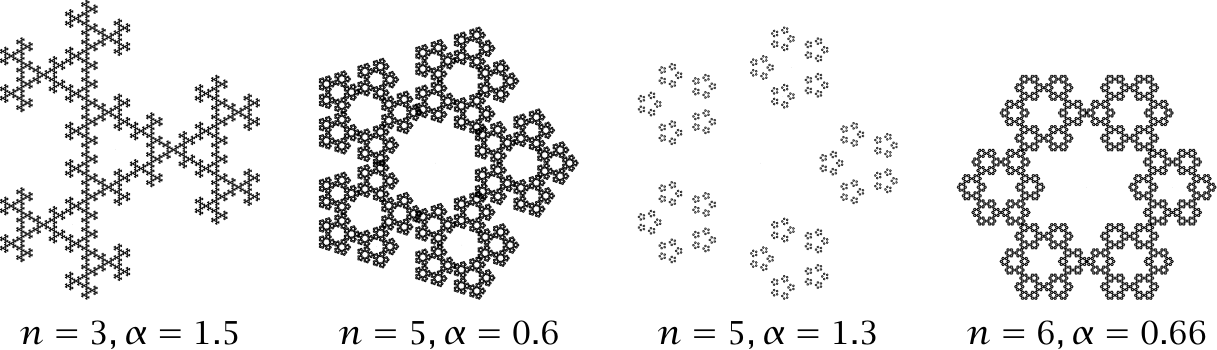
d)Figure C.1 shows a few examples of shapes obtained by varying the number of corners and the factor \(\alpha \). Each of the resulting shapes is self-similar and consists of \(n\) smaller
copies of itself, which in turn consist of \(n\) smaller copies, and so on. Empirically, the chaos game converges for all \(0<\alpha <2\) and diverges for values of \(\alpha \) outside this range. For \(0.5<\alpha <1.5\) the resulting shapes are self-similar.
Figure C.1 IFS fractals based on regular polygons.
Solution to Exercise 1.7
a)The IFSPainter class in Listing C.5 can be used to draw point sets to a bitmap image. The class has three fields: the BufferedImage that holds the result, an instance of Graphics2D that is used to draw to this image, and the radius of each point in the coordinate system used by graphics.
Listing C.5ch1 / IFSPainter
// Create images of point sets produced using iterated function systems.
public class IFSPainter {
    private BufferedImage image;  // resulting raster image
    private Graphics2D graphics;  // graphics context for image
    private double radius;  // scaled radius of a single point

    public void drawPoints(List<Point> points) {
        for (Point p : points) {
            graphics.fill(
                    new Ellipse2D.Double(p.x(), p.y(), radius, radius));
        }
    }

    // ...
}
The constructor in Listing C.6 takes the list of points, the desired size of the image in pixels, and the radius of each point in pixels. First, image is initialized to a BufferedImage whose long side has imageLongSize pixels and that has the same aspect ratio as the point set being drawn. We then create a graphics context for this image and store it in graphics. The
coordinate system is set up in such a way that the point set completely fills the image. Finally, the member variable radius is set to the radius of each point in the scaled coordinate system.
Listing C.6ch1 / IFSPainter
public IFSPainter(List<Point> points, int longSide,
        double pointRadius) {
    // Create an image with the same aspect ratio as the point set
    var region = Rectangle.boundingBox(points);
    double scaleFactor = longSide
            / Math.max(region.width(), region.height());
    image = new BufferedImage(
            (int) Math.round(region.width() * scaleFactor),
            (int) Math.round(region.height() * scaleFactor),
            BufferedImage.TYPE_INT_ARGB);
    radius = pointRadius / scaleFactor;

    // Initialize graphics context
    graphics = image.createGraphics();
    graphics.setRenderingHint(RenderingHints.KEY_ANTIALIASING,
            RenderingHints.VALUE_ANTIALIAS_ON);
    graphics.fillRect(0, 0, image.getWidth(), image.getHeight());
    graphics.setColor(Color.BLACK);
    graphics.translate(0, image.getHeight());
    graphics.scale(scaleFactor, -scaleFactor);
    graphics.translate(-region.bottomLeft().x(),
            -region.bottomLeft().y());
}
b)The first step is to extend the lerp function to scalar values and affine transformations, as shown in Listing C.7. We can then define a function blend() that mixes two instances of AffineIFS and their probabilities using linear interpolation. If the function systems differ in size, the smaller function system is extended using affine transformations in which all coefficients are 0 (nullTransform)
and whose probability are set to 0 as well.
Listing C.7ch1 / IFSBlend
static double lerp(double x, double y, double t) {
    return (1 - t) * x + t * y;
}

static Affine lerp(Affine x, Affine y, double t) {
    return new Affine(
            lerp(x.a(), y.a(), t), lerp(x.b(), y.b(), t),
            lerp(x.c(), y.c(), t), lerp(x.d(), y.d(), t),
            lerp(x.tx(), y.tx(), t), lerp(x.ty(), y.ty(), t));
}

public static AffineIFS blend(AffineIFS f, AffineIFS g, double t) {
    int n = f.transforms.length, m = g.transforms.length;
    int size = Math.max(n, m);
    Affine[] transforms = new Affine[size];
    double[] frequencies = new double[size];
    Affine nullTransform = new Affine(0, 0, 0, 0, 0, 0);
    for (int i = 0; i < size; i++) {
        transforms[i] = lerp(i < n ? f.transforms[i] : nullTransform,
                i < m ? g.transforms[i] : nullTransform, t);
        frequencies[i] = lerp(i < n ? f.probabilities[i] : 0,
                i < m ? g.probabilities[i] : 0, t);
    }
    return new AffineIFS(transforms, frequencies);
}